# ONEWEB Concepts
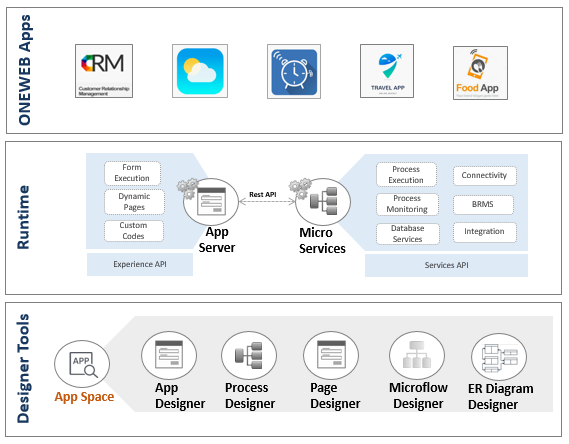
**ONEWEB Apps** are end‑user applications created through collaboration on the ONEWEB Platform. These applications can include user interfaces, backend services, business processes, and system integrations—depending on the business requirements they are designed to support.
Rather than focusing on a single application layer, ONEWEB treats an application as a composition of multiple capabilities that work together throughout the application lifecycle.
At a conceptual level, the ONEWEB Platform is composed of three core elements:
* **AppSpace**
* **Designer Studios**
* **Runtimes**
These elements form the foundation for how applications are designed, executed, and managed on ONEWEB.
***
### **AppSpace**
**AppSpace** acts as the central workspace for creating and managing ONEWEB Apps.
It provides a unified environment where users can:
* Organize application components
* Navigate between design, development, and management tasks
* Control application versions and deployment lifecycle
AppSpace enables teams to collaborate effectively by bringing all application‑related activities into a single control center.
***
### 🎨 Designer Studios
**Designer Studios** are a collection of visual design tools used to create different aspects of a ONEWEB App.
Through Designer Studios, users can:
* Design user interfaces and application structure
* Model business processes and workflows
* Define data models and application logic
These tools allow both technical and non‑technical users to participate in application development, while still supporting extensibility and customization when needed.
***
### ⚙️ Runtimes
**Runtimes** are responsible for executing ONEWEB Apps and their associated logic.
They provide the execution environment for:
* User interface interactions
* Business process flows
* Backend services and integrations
By separating design‑time activities from runtime execution, ONEWEB ensures that applications can be reliably deployed, scaled, and managed across environments.
---
# Agent Instructions: Querying This Documentation
If you need additional information that is not directly available in this page, you can query the documentation dynamically by asking a question.
Perform an HTTP GET request on the current page URL with the `ask` query parameter:
```
GET https://docs.onewebstack.com/oneweb-platform-th/overview/what-is-oneweb/oneweb-concepts.md?ask=
```
The question should be specific, self-contained, and written in natural language.
The response will contain a direct answer to the question and relevant excerpts and sources from the documentation.
Use this mechanism when the answer is not explicitly present in the current page, you need clarification or additional context, or you want to retrieve related documentation sections.