# Timer Event
The **Timer Event** is used to define **time‑based control** within a business process.\
It specifies the maximum time allowed for an activity to execute and triggers an alternative action when the defined time condition is met.
In the Process Template Diagram, a Timer Event is represented by a **small clock icon**, as shown below.
***
### Purpose
**Timer Events** are used to enforce **time constraints** and handle **time‑based exceptions** in a process.
They can be applied to:
* Limit how long a task may remain active
* Trigger escalation or reminder actions
* Automatically terminate or redirect flow when deadlines are exceeded
A Timer Event can be used as:
* a **Start Event**
* an **Intermediate Event**
* a **Boundary Event** (the most common usage)
***
### Timer Event as a Boundary Event
When a Timer Event is attached to an activity as a **Boundary Event**, it monitors the execution duration of that activity.
#### Example scenario
* A process reaches a **Human Task**
* A **Timer Boundary Event** is attached to that task
* If the task is not completed within the defined time limit:
* The Timer Event is triggered
* The process can:
* Send a notification or email
* Escalate to a manager or Work Party lead
* Terminate or redirect the task flow
This allows processes to react proactively to **delays or inactivity**.
***
### Timer Configuration Overview
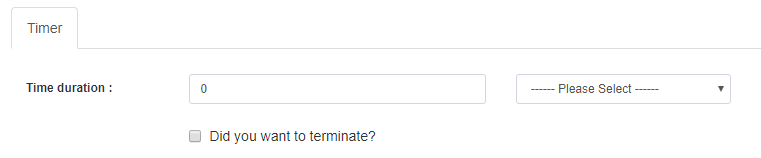
The Timer Event configuration panel contains **one main tab**:
1. **Timer**
***
### Timer Tab
The **Timer** tab defines the time condition that controls when the event is triggered.
#### Timer Properties
| Property | Mandatory | Default | Description |
| ------------- | --------- | --------- | ----------------------------------------------------------------- |
| Time Duration | Yes | 0 | Maximum allowed execution time for the associated task |
| Time Unit | Yes | — | Unit of time (e.g. seconds, minutes, hours, days) |
| Terminate | No | Unchecked | Terminates the task automatically when the time limit is exceeded |
***
### Timer Behavior
* When **Time Duration** is reached:
* The Timer Event is triggered
* If **Terminate** is enabled:
* The associated task is forcibly terminated
* If **Terminate** is disabled:
* The task may continue
* An alternative flow (e.g. escalation path) is executed
***
### Usage Guidelines
* Use Timer Events to enforce **SLAs and deadlines**
* Attach Timer Boundary Events to long‑running or user‑driven tasks
* Clearly design escalation or fallback paths
* Use meaningful durations and time units
* Avoid excessive timers that may complicate process logic
***
### Summary
The **Timer Event** provides essential **time‑based control** in ONEWEB Process Designer.
Key points:
* Enforces execution time limits
* Can act as Start, Intermediate, or Boundary Event
* Commonly used to monitor Human Tasks
* Triggers escalation, reminders, or termination
* Enhances process reliability and responsiveness
Proper use of Timer Events ensures that business processes remain **time‑bound, controlled, and aligned with operational expectations**.
---
# Agent Instructions: Querying This Documentation
If you need additional information that is not directly available in this page, you can query the documentation dynamically by asking a question.
Perform an HTTP GET request on the current page URL with the `ask` query parameter:
```
GET https://docs.onewebstack.com/oneweb-platform-th/designer-reference/process-designer/process-designer-component/boundary-events/timer-event.md?ask=
```
The question should be specific, self-contained, and written in natural language.
The response will contain a direct answer to the question and relevant excerpts and sources from the documentation.
Use this mechanism when the answer is not explicitly present in the current page, you need clarification or additional context, or you want to retrieve related documentation sections.