# Utilities
The **Utilities** section in **App Designer** provides a collection of supporting tools that help users configure, manage, and maintain application‑level components beyond individual entity design.
These utilities are designed to support **menu management**, **entity relationships**, and **master data migration** across environments.
***
### Purpose of Utilities
Utilities in App Designer are used to:
* Configure ONEWEB application menus
* Establish relationships between entities
* Manage parent–child entity structures
* Import and export master setup data
* Support environment‑to‑environment configuration migration
They complement core entity design features and play a key role in **application structuring and governance**.
***
### Accessing App Designer Utilities
To access Utilities in App Designer:
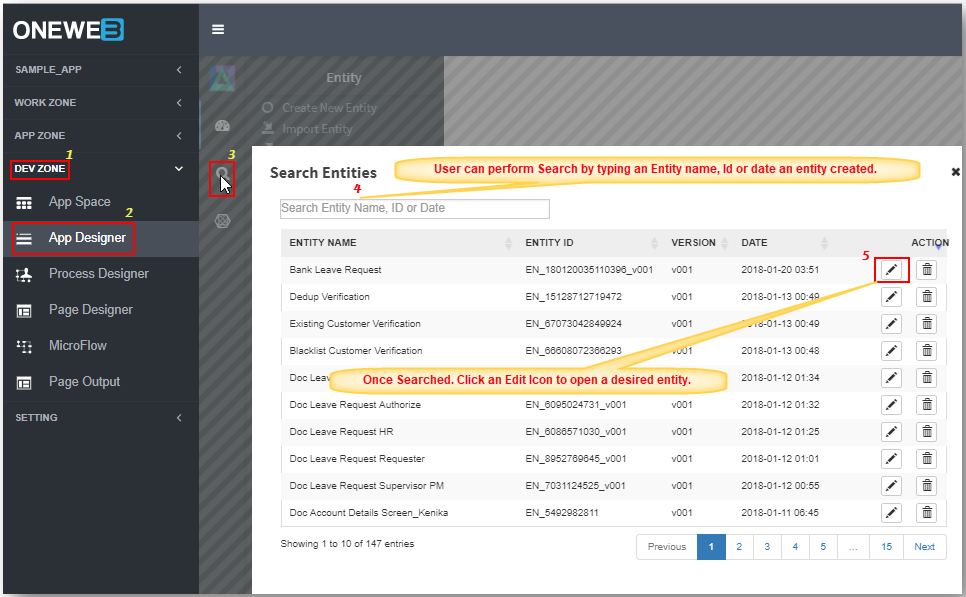
1. Navigate to **DEV ZONE** from the ONEWEB main menu
2. Select **App Designer**
3. Click the **Utilities** icon  in the App Designer toolbar
The Utilities screen displays the list of available tools.
***
### Available Utilities in App Designer
App Designer provides the following key utilities:
#### 1️. Menu Configuration
* Used to design and manage **ONEWEB application menus**
* Controls how entities and screens are organized in the navigation structure
* Supports custom menu hierarchy and layout
***
#### 2️. Parent–Child Entity Configuration
* Used to define **relationships between two entities**
* Establishes **parent–child** or hierarchical data structures
* Enables relational navigation and integrated data handling
***
#### 3️. Master Import / Export
* Used to **export master setup data** from one environment
* Allows importing the same setup into another environment
* Commonly used for configuration synchronization across Dev / Test / Prod
***
Each utility focuses on a specific aspect of application design and management and is described in more detail in the sections that follow.
***
### Usage Guidelines
* Access Utilities only when application‑level configuration is required
* Use **Menu Configuration** to keep navigation simple and consistent
* Define **Parent–Child relationships** carefully to align with data model design
* Use **Master Import / Export** for controlled environment migration
* Always validate application behavior after applying Utilities changes
***
### Summary
The **Utilities** section in App Designer provides essential tools for managing application‑wide configurations.
Key points:
* Centralized access to non‑entity configuration tools
* Supports menu design, entity relationships, and master data migration
* Helps maintain consistency across environments
* Complements entity and Smart Form design
Utilities ensure that ONEWEB applications are not only well‑designed at the entity level, but also **well‑structured, connected, and portable** at the application level.
---
# Agent Instructions: Querying This Documentation
If you need additional information that is not directly available in this page, you can query the documentation dynamically by asking a question.
Perform an HTTP GET request on the current page URL with the `ask` query parameter:
```
GET https://docs.onewebstack.com/oneweb-platform-th/designer-reference/app-designer/utilities.md?ask=
```
The question should be specific, self-contained, and written in natural language.
The response will contain a direct answer to the question and relevant excerpts and sources from the documentation.
Use this mechanism when the answer is not explicitly present in the current page, you need clarification or additional context, or you want to retrieve related documentation sections.