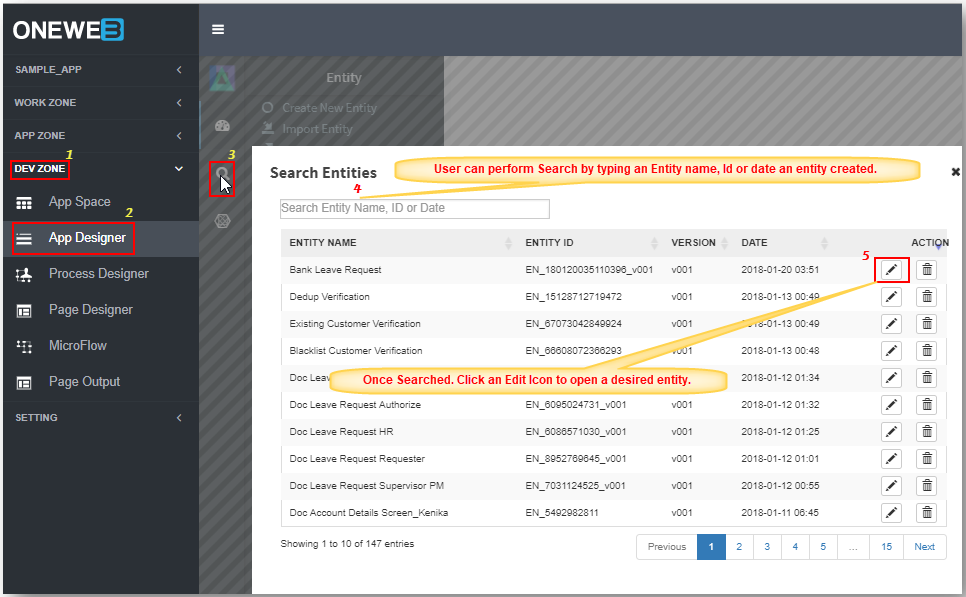
# Search
The **Search** feature in **App Designer** allows users to quickly locate **existing Entities** within an application.\
This feature is especially useful when working with applications that contain a large number of entities.
The search function is available directly from the **App Designer UI** and helps improve productivity by reducing the time spent navigating entity lists.
***
### Purpose of Search in App Designer
The App Designer Search feature is designed to:
* Quickly find existing entities
* Navigate directly to an entity for editing or review
* Improve usability in applications with many entities
* Avoid duplication by checking existing entity definitions
***
### Accessing the Search Feature
To access the Search feature in App Designer:
1. Open **DEV ZONE** from the ONEWEB main menu
2. Navigate to **App Designer**
3. Click the **Search** icon  in the App Designer interface
***
### Searching for an Entity
The following steps illustrate how to use the **Search Entity** feature in App Designer.
#### Typical Search Flow
1. Open the **Search** interface from App Designer
2. Enter the **Entity name** or keyword
3. Review the list of matching entities
4. Select the desired entity from the search results
5. Open the entity directly in App Designer
***
### Search Behavior
* The search matches entity names based on user input
* Results are displayed in a list for easy selection
* Users can immediately open an entity from the search results
* The search feature works across all entities within the current application
***
### Usage Guidelines
* Use meaningful and consistent entity names to improve search results
* Search before creating a new entity to avoid duplicates
* Use partial keywords if the full entity name is not known
* Leverage search frequently when working with large applications
***
### Summary
The **Search** feature in App Designer provides a fast and efficient way to locate existing entities within an application.
Key points:
* Accessible from **DEV ZONE → App Designer**
* Enables quick lookup of existing entities
* Improves navigation and productivity
* Helps prevent duplicate entity creation
The Search feature is an essential tool for managing and maintaining **large‑scale Smart Form applications** in ONEWEB.
---
# Agent Instructions: Querying This Documentation
If you need additional information that is not directly available in this page, you can query the documentation dynamically by asking a question.
Perform an HTTP GET request on the current page URL with the `ask` query parameter:
```
GET https://docs.onewebstack.com/oneweb-platform-th/designer-reference/app-designer/search.md?ask=
```
The question should be specific, self-contained, and written in natural language.
The response will contain a direct answer to the question and relevant excerpts and sources from the documentation.
Use this mechanism when the answer is not explicitly present in the current page, you need clarification or additional context, or you want to retrieve related documentation sections.