# Import Entity
The **Import Entity** feature allows users to **import business entities in JSON format** from one environment into another.\
This capability enables seamless migration of entity designs across environments such as Development, Test, and Production.
Import Entity is typically used together with **Export Entity** to support application deployment, backup restoration, and environment synchronization.
***
### Purpose of Import Entity
The **Import Entity** feature is used to:
* Import entities exported from other ONEWEB environments
* Restore entities from JSON backups
* Reuse entity definitions across applications
* Support controlled deployment and release processes
* Enable environment‑to‑environment migration
Imported entities retain their structure, configuration, and metadata as defined in the exported JSON file.
***
### Importing an Entity from JSON
To import an Entity into the current environment, perform the following steps.
***
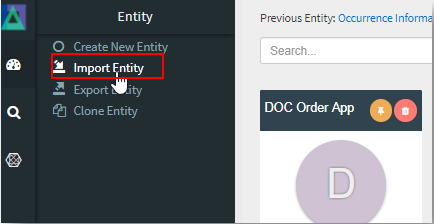
#### Step 1: Open the Import Entity Menu
1. Go to the **Entity Menu** at the top‑left corner
2. Navigate to **Entity → Import Entity**
***
#### Step 2: Select Import Entity Option
The Import Entity screen will be displayed.
***
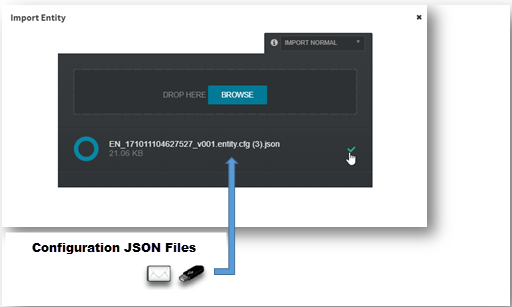
#### Step 3: Browse and Import JSON File
1. Click **Browse** to select the exported **Entity JSON file** from your local machine
2. Confirm the selected file
3. Proceed with the **Import Entity** action
Once completed, the Entity is imported into the **current environment**.
***
### Imported Content Scope
When an Entity is imported, the following elements are restored:
* Entity definition and metadata
* Module configuration
* Fields and field properties
* Tabs and tab conditions
* Buttons and actions
* Layout and behavioral settings
This ensures the imported entity behaves consistently with its original design.
***
{% hint style="info" %}
**Important Note**
* **Child Entities are not automatically imported**
* Each dependent or child entity must be imported **separately**
* ONEWEB does not resolve entity dependencies automatically during import
Ensure all related entities are imported to avoid runtime or configuration issues.
{% endhint %}
***
### Usage Guidelines
* Always **export before import** when migrating between environments
* Verify entity name conflicts before importing into an existing application
* Import dependent entities manually in the correct order
* Validate entity behavior after import
* Use consistent versioning for exported JSON files
* Avoid importing production entities directly into development without review
***
### Summary
The **Import Entity** feature enables reliable and flexible entity migration in ONEWEB.
Key points:
* Imports entities from JSON files
* Supports cross‑environment migration
* Restores full entity configuration
* Requires manual handling of child entities
* Essential for deployment and recovery workflows
Used together with **Export Entity**, this feature ensures **safe portability, reuse, and lifecycle management** of entities across the ONEWEB platform.
---
# Agent Instructions: Querying This Documentation
If you need additional information that is not directly available in this page, you can query the documentation dynamically by asking a question.
Perform an HTTP GET request on the current page URL with the `ask` query parameter:
```
GET https://docs.onewebstack.com/oneweb-platform-th/designer-reference/app-designer/entity/import-entity.md?ask=
```
The question should be specific, self-contained, and written in natural language.
The response will contain a direct answer to the question and relevant excerpts and sources from the documentation.
Use this mechanism when the answer is not explicitly present in the current page, you need clarification or additional context, or you want to retrieve related documentation sections.