# Export Entity
Entities designed on the **ONEWEB Platform** are **portable** and can be transferred between environments.\
App Designer provides an **Export Entity** feature that allows users to export an Entity as **JSON data**, making it easy to migrate, back up, or share entity definitions.
***
### Purpose of Export Entity
The **Export Entity** feature is used to:
* Migrate entities between environments (e.g. Dev → Test → Production)
* Back up entity definitions for safety or versioning
* Share entities across teams or applications
* Store entity designs in external or portable storage
* Support controlled deployment workflows
Exported entities are saved in **JSON format**, ensuring compatibility and portability.
***
### Exporting an Entity as JSON
To export an Entity:
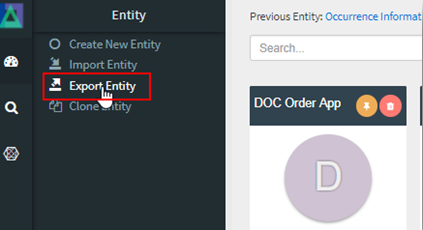
#### Step 1: Open the Export Entity Menu
1. Go to the **Entity Menu** (top‑left corner)
2. Navigate to **Entity → Export Entity**
***
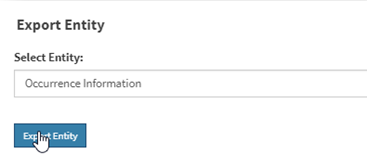
#### Step 2: Select the Entity
* Choose the required Entity from the **Select Entity** dropdown list
* Click **Export Entity**
***
#### Step 3: Save Exported File
* The selected Entity is exported as a **JSON file**
* The file is downloaded to the user’s **local machine**
* The JSON file can now be:
* Imported into another ONEWEB environment
* Stored as a backup
* Transferred via external storage devices
***
### Exported Content Scope
The exported JSON includes:
* Entity definition and metadata
* Modules and their configurations
* Fields, tabs, buttons, and actions
* Layout and behavioral settings
***
{% hint style="info" %}
**Important Note**\
When exporting or importing an Entity:
* **Child Entities are NOT included automatically**
* Each child entity must be **exported and imported individually**
* ONEWEB does not bundle related entities by default
Ensure that all dependent entities are handled separately during migration.
{% endhint %}
***
### Usage Guidelines
* Export entities before major design changes as a backup
* Use consistent naming and versioning for exported JSON files
* Export all dependent entities manually when migrating a complex model
* Validate entity behavior after importing into a new environment
* Keep exported files in a secure location for audit or recovery purposes
***
### Summary
The **Export Entity** feature enables seamless portability of entities across environments in ONEWEB.
Key points:
* Entities can be exported as JSON files
* Supports migration, backup, and reuse
* Exported files are portable and environment‑independent
* Child entities must be exported separately
* Simplifies deployment and environment management
Using Export Entity effectively ensures **safe migration, reliable backups, and scalable application lifecycle management** in ONEWEB App Designer.
---
# Agent Instructions: Querying This Documentation
If you need additional information that is not directly available in this page, you can query the documentation dynamically by asking a question.
Perform an HTTP GET request on the current page URL with the `ask` query parameter:
```
GET https://docs.onewebstack.com/oneweb-platform-th/designer-reference/app-designer/entity/export-entity.md?ask=
```
The question should be specific, self-contained, and written in natural language.
The response will contain a direct answer to the question and relevant excerpts and sources from the documentation.
Use this mechanism when the answer is not explicitly present in the current page, you need clarification or additional context, or you want to retrieve related documentation sections.