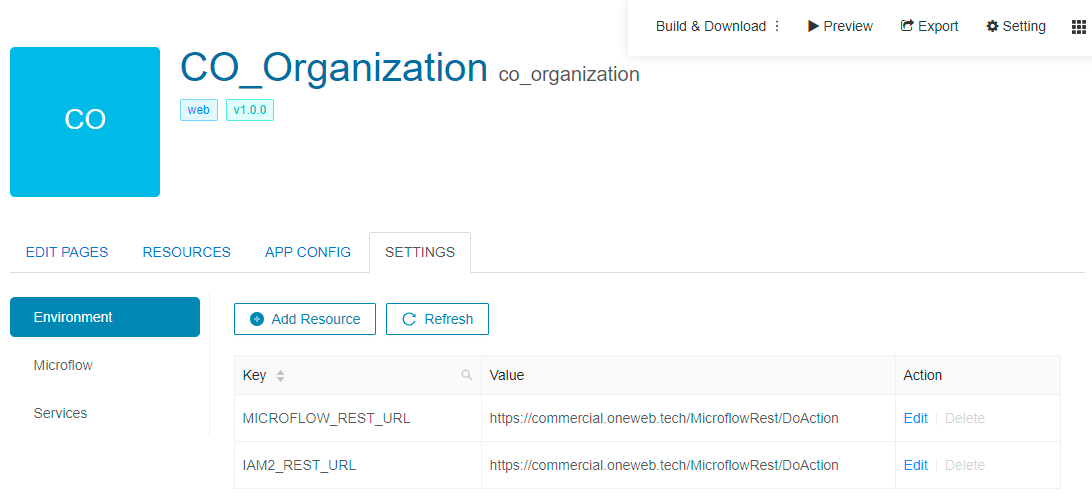
# Environment Variables
Starting from **ONEWEB version 5.0.21.01**, Page Designer introduces **Environment Variables**, a feature that allows users to **configure environment‑specific values** in a centralized and flexible way.
Environment Variables help applications adapt to different environments such as:
* **Development**
* **SIT**
* **UAT**
* **Production**
without requiring changes to page logic or redeployment of UI code.
***
### What Are Environment Variables?
**Environment Variables** are key‑value pairs that:
* Are defined per environment
* Can store configuration values (URLs, flags, identifiers, etc.)
* Can be accessed inside pages **like JavaScript variables**
They provide a clean separation between:
* **Application logic**
* **Environment‑specific configuration**
***
### Types of Environment Variables
#### User‑Defined Environment Variables
User‑defined variables allow application developers to define their own configuration values, such as:
* API base URLs
* Feature toggles
* Environment‑specific constants
* External service endpoints
Once defined, these variables can be referenced anywhere in the page application.
***
#### System‑Level Environment Variables
ONEWEB also provides **system‑level variables**, typically used for:
* **Microflow service URLs**
* **IAM2 configuration**
* Platform‑level integrations
These variables are often pre‑configured to support different runtime environments (SIT, UAT, PROD, etc.).
***
### Access Environment Variables Configuration
Environment Variables are managed from a dedicated configuration screen in Page Designer.
From this screen, users can:
* Define new variables
* Specify different values per environment
* Manage and update existing variables centrally
***
### Using Environment Variables in Pages
Once an Environment Variable is defined:
* It can be accessed within pages **like a JavaScript variable**
* It can be used inside:
* Page scripts
* Page actions
* Dynamic configurations
* Expressions and logic blocks
This allows the same page design to behave differently depending on the environment it is running in.
***
### Common Use Cases
Environment Variables are commonly used for:
* Switching API endpoints between environments
* Configuring Microflow service URLs
* Managing authentication or IAM endpoints
* Enabling or disabling environment‑specific features
* Avoiding hard‑coded configuration values
***
### Benefits of Environment Variables
Using Environment Variables provides several advantages:
* Eliminates hard‑coded URLs or constants
* Simplifies environment promotion (SIT → UAT → PROD)
* Reduces risk of configuration errors
* Improves maintainability and security
* Centralized configuration management
***
### Design Perspective
As part of **Page Designer best practices**:
* Always use Environment Variables for environment‑dependent values
* Avoid embedding environment‑specific URLs directly in pages
* Clearly name variables to reflect their purpose
* Group related variables for better readability
* Validate values when moving between environments
Environment Variables enable ONEWEB applications to remain **portable, configurable, and enterprise‑ready**.
---
# Agent Instructions: Querying This Documentation
If you need additional information that is not directly available in this page, you can query the documentation dynamically by asking a question.
Perform an HTTP GET request on the current page URL with the `ask` query parameter:
```
GET https://docs.onewebstack.com/oneweb-platform-th/building-apps/ui-page-designer/ux-ui-components/pages/page-features/environment-variables.md?ask=
```
The question should be specific, self-contained, and written in natural language.
The response will contain a direct answer to the question and relevant excerpts and sources from the documentation.
Use this mechanism when the answer is not explicitly present in the current page, you need clarification or additional context, or you want to retrieve related documentation sections.