# Sample Use Cases for Process Runtime REST API
A **Custom Application** is an external application developed outside the ONEWEB platform that follows a company’s business requirements.\
Such applications can interact with ONEWEB **Process Runtime** using **Process Runtime REST APIs** to **start, control, and complete business processes**.
Using these APIs, developers can orchestrate workflows end‑to‑end from external systems (web, mobile, or third‑party applications).
***
### Use Case Overview
**Use Case:**\
A Custom Application controls a **Room Booking** business process hosted in ONEWEB.
The Custom App:
* Starts the booking process
* Retrieves runtime tasks
* Assigns tasks to users
* Allows users to claim, unclaim, and complete tasks
* Drives the process until completion
***
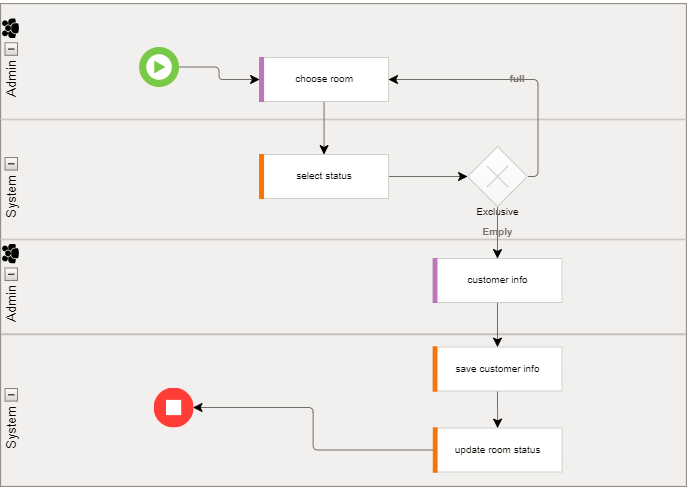
### Example Process: *Booking Room*
The following process illustrates a typical **Booking Room** workflow:
* User selects a room
* System checks booking status
* If the room is already booked → user selects another room
* If the room is available → customer details are entered
* Booking is saved to the database
* Room status is updated
* Process continues until completion
This process is fully controlled from a **Custom App** using REST APIs.
***
### Step‑by‑Step: Controlling Process via REST API
***
#### Step 1: Start the Process Flow
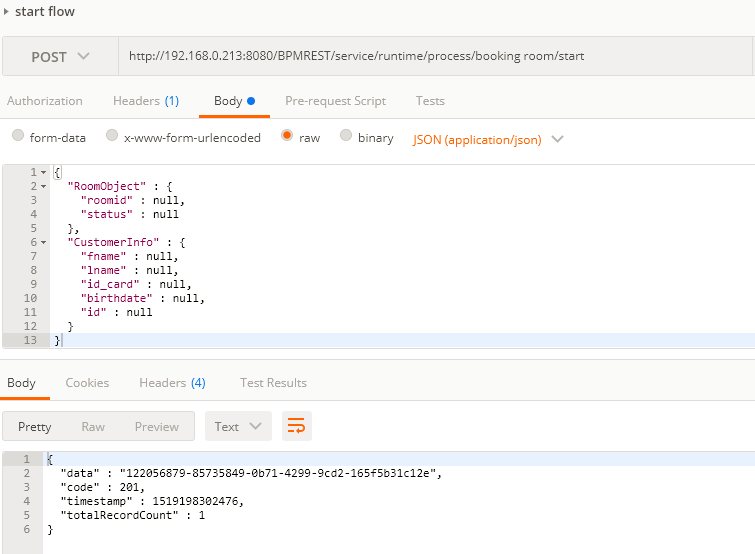
The Custom App starts the process by calling the **Start Process API**.
* Input parameters are passed as JSON
* In this example, the parameters are:
* `RoomObject`
* `CustomerInfo`
**Result:**
* The system starts a new process instance
* A unique **Instance ID** is returned (e.g.\
`122056879-85735849-0b71-4299-9cd2-165f5b31c12e`)
This Instance ID is required to control subsequent steps.
***
#### Step 2: Retrieve Task Using Instance ID
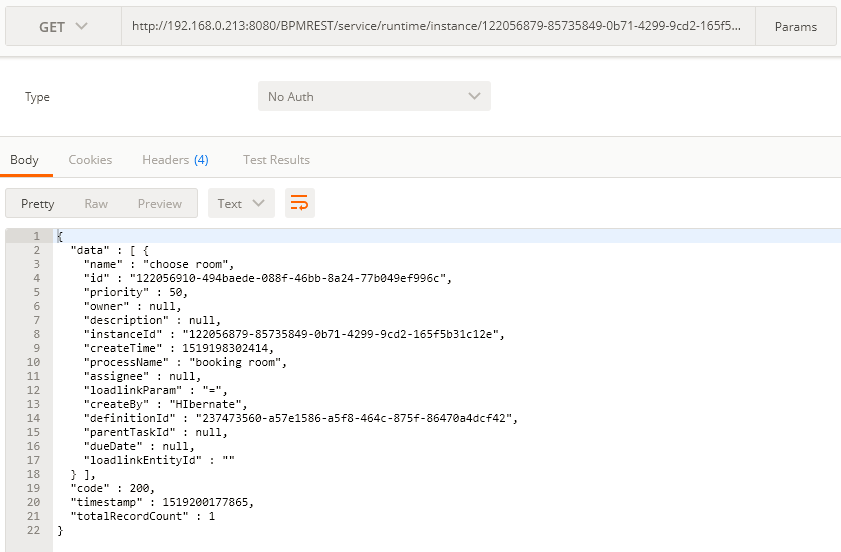
Using the **Instance ID**, the developer retrieves the current task(s) of the process.
* API: `Get task by instance ID`
* The system returns:
* Task ID
* Task name
* Task metadata
The **Task ID** will be used for assignment and completion.
***
#### Step 3: Assign Task to User
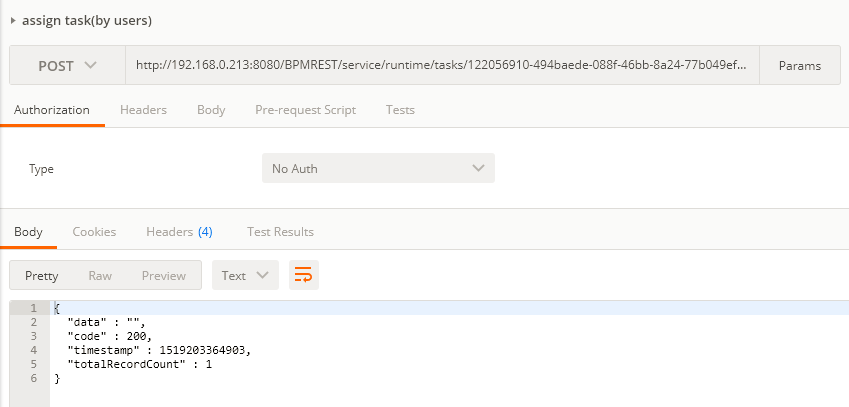
Once the Task ID is known, the Custom App assigns the task to a user.
**Example API Call:**
```
http://192.168.0.213:8080/BPMREST/service/runtime/tasks/
122056910-494baede-088f-46bb-8a24-77b049ef996c
/assign?user=origcmr4
```
**Result:**
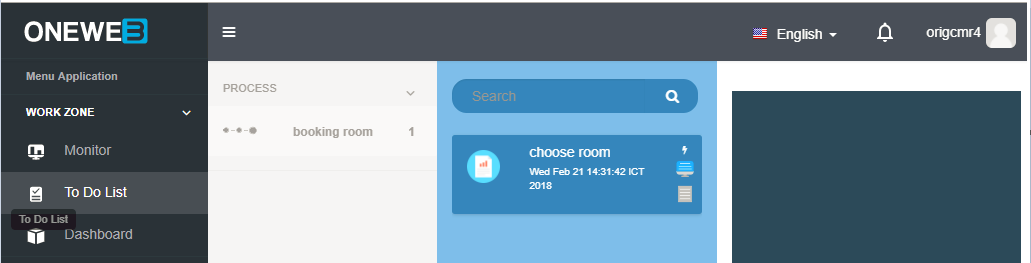
* The task appears in the **To‑Do List** of user `origcmr4`
***
#### Alternative Task Assignment Method
Tasks can also be assigned **directly using the Instance ID**:
```
http://192.168.0.213:8080/BPMREST/service/runtime/instance/
122056879-85735849-0b71-4299-9cd2-165f5b31c12e
/tasks/assign?user=origcmr4
```
This assigns all active tasks in the process instance to the user.
***
#### Step 4: Claim / Unclaim / Complete Task
The assigned user can now control the task lifecycle.
**Claim Task**
```
.../tasks/{taskId}/claim?user=origcmr4
```
**Unclaim Task**
```
.../tasks/{taskId}/claim?user=
```
**Complete Task**
```
.../tasks/{taskId}/complete?user=origcmr4
```
After **Complete** is called:
* The task is finished
* The process automatically moves to the **next activity**
* The workflow continues based on process configuration
***
### End‑to‑End Integration Pattern
From a Custom App, the full process control pattern is:
1. Start process
2. Receive Instance ID
3. Retrieve tasks
4. Assign task(s)
5. Claim and complete tasks
6. Continue until End Event
This enables complete **external orchestration of business workflows**.
***
### Summary
This example demonstrates how a **Custom Application** can fully control a ONEWEB **Process Flow** using **Process Runtime REST APIs**.
With these APIs, external systems can:
* Start business processes
* Track and manage process instances
* Assign, claim, and complete human tasks
* Drive workflows end‑to‑end without ONEWEB UI
The **Process Runtime REST API** is essential for integrating ONEWEB BPM capabilities into **enterprise systems, portals, mobile apps, and third‑party platforms**.
---
# Agent Instructions: Querying This Documentation
If you need additional information that is not directly available in this page, you can query the documentation dynamically by asking a question.
Perform an HTTP GET request on the current page URL with the `ask` query parameter:
```
GET https://docs.onewebstack.com/oneweb-platform-th/building-apps/integrations/process-runtime-rest-api/sample-use-cases-for-process-runtime-rest-api.md?ask=
```
The question should be specific, self-contained, and written in natural language.
The response will contain a direct answer to the question and relevant excerpts and sources from the documentation.
Use this mechanism when the answer is not explicitly present in the current page, you need clarification or additional context, or you want to retrieve related documentation sections.