# JSON Path Mapping
Starting from **ONEWEB version 4.0.19.12**, users can use **JSONPath syntax** to extract values from **REST service responses** that contain complex or deeply nested JSON structures.
This capability enhances REST integration by allowing precise data extraction during **output parameter mapping**, without requiring additional transformation logic.
***
### Purpose of JSON Path Mapping
JSON Path Mapping is used to:
* Retrieve specific values from complex JSON responses
* Extract nested fields or array elements
* Map REST service responses accurately to Business Objects
* Simplify REST integration without custom code
This is particularly useful when working with third‑party APIs that return large or deeply nested JSON payloads.
***
### Where JSON Path Is Used in ONEWEB
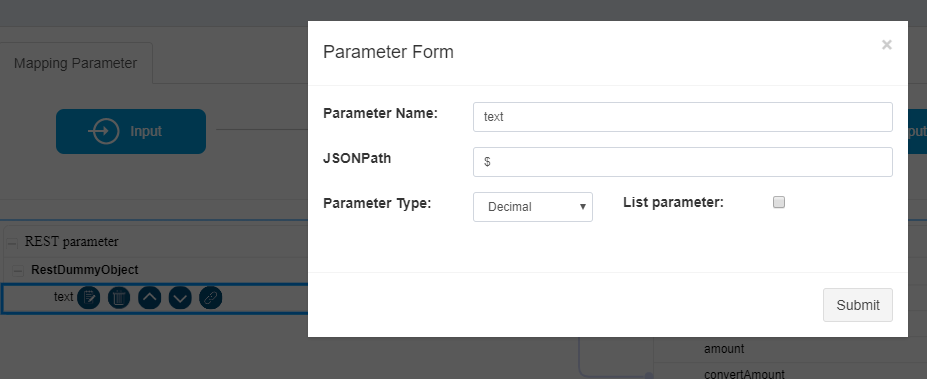
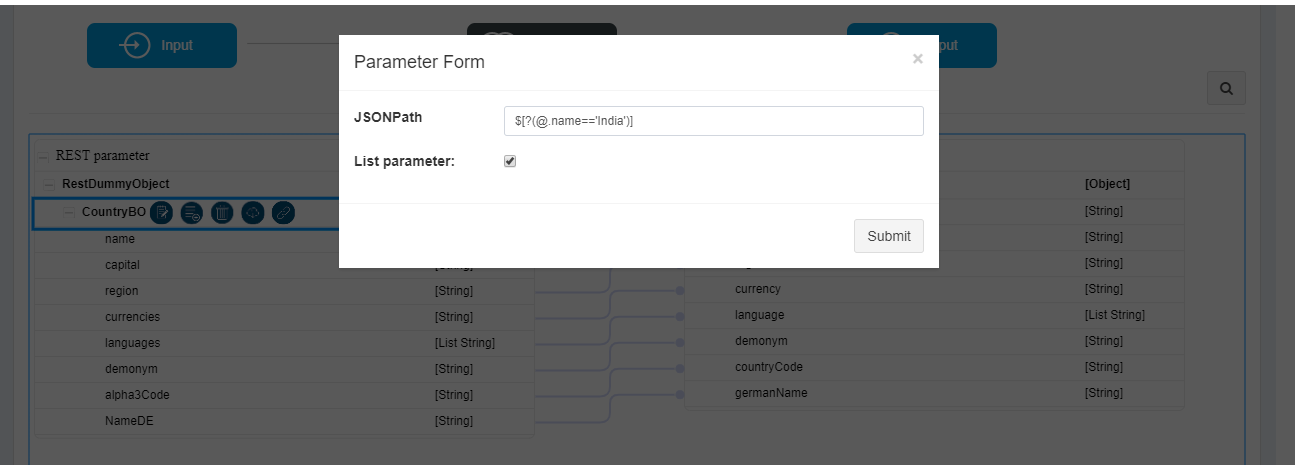
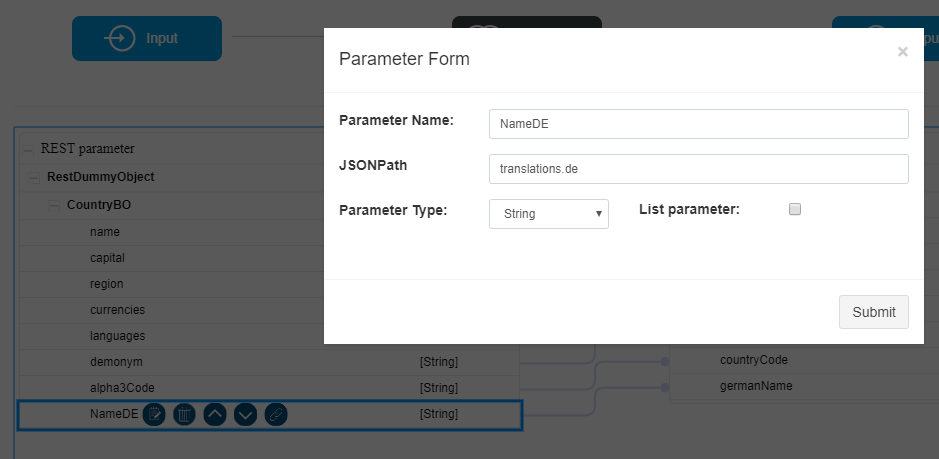
JSONPath expressions are applied in the **Output Mapping screen** of a **REST Web Service Task**, specifically under the **RestDummyObject**.
When mapping REST output parameters:
* Each output parameter can be associated with a JSONPath expression
* The expression defines how the value is extracted from the response JSON
***
### Using JSON Path in REST Output Mapping
To use JSON Path mapping:
1. Configure a **REST Web Service Task** in Microflow
2. Open **Open Mapping Parameter** for the REST task
3. Navigate to the **Output Mapping** section
4. Under **RestDummyObject**, enter the JSONPath expression for the desired parameter
The following screenshots illustrate how JSONPath expressions are entered and mapped:
***
### JSONPath Reference
JSONPath uses an expression syntax similar to XPath but designed for JSON structures.
For detailed syntax and examples, refer to the official JSONPath documentation:
> Link:
***
### Using Online JSONPath Evaluators
To make mapping easier, users can test and validate JSONPath expressions using online tools before applying them in ONEWEB.
Commonly used JSONPath evaluators include:
* Link:
These tools allow you to:
* Paste a sample JSON response
* Test different JSONPath expressions
* Identify the correct expression to retrieve the required value
This helps reduce trial‑and‑error during Microflow configuration.
***
### Best Practices for JSON Path Mapping
* Always test JSONPath expressions with real sample responses
* Keep expressions as specific as possible to avoid ambiguity
* Be careful when mapping values from arrays
* Handle optional or missing fields gracefully
* Avoid overly complex expressions when simpler structures are available
***
### Summary
**JSON Path Mapping** enhances REST service integration in ONEWEB by enabling precise extraction of data from complex JSON responses.
With JSONPath support, developers can:
* Map deeply nested REST response fields
* Simplify REST output mapping
* Improve accuracy and maintainability of integrations
* Avoid unnecessary transformation logic
This feature is especially important for **enterprise‑grade API integrations**, where response structures are often complex and deeply nested.
---
# Agent Instructions: Querying This Documentation
If you need additional information that is not directly available in this page, you can query the documentation dynamically by asking a question.
Perform an HTTP GET request on the current page URL with the `ask` query parameter:
```
GET https://docs.onewebstack.com/oneweb-platform-th/building-apps/integrations/develop-integration-with-oneweb-microflow/json-path-mapping.md?ask=
```
The question should be specific, self-contained, and written in natural language.
The response will contain a direct answer to the question and relevant excerpts and sources from the documentation.
Use this mechanism when the answer is not explicitly present in the current page, you need clarification or additional context, or you want to retrieve related documentation sections.