# Data Transformation
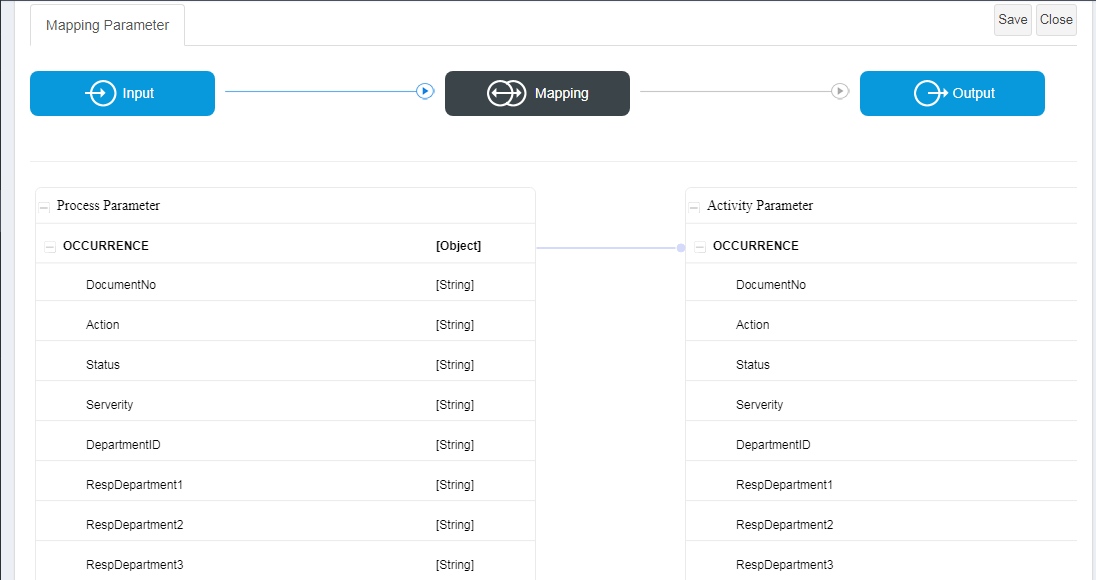
While **Data Mapping** focuses on linking inbound and outbound parameters between components, **Data Transformation** extends this concept by allowing **data to be transformed during the mapping process**.
In ONEWEB, data transformation can be applied **directly on the mapping connection**, enabling developers to modify values, apply formulas, or construct expressions before data is passed to the target component.
***
### Data Transformation vs Data Mapping
| Aspect | Data Mapping | Data Transformation |
| ----------- | --------------------- | ------------------------------------ |
| Purpose | Connect parameters | Modify data during mapping |
| Logic | Direct value transfer | Formula‑based conversion |
| UI | Drag & drop mapping | Formula Editor |
| Typical Use | Pass values as‑is | Calculate, format, or combine values |
Data Transformation is therefore used when values **cannot be passed directly** and must be adjusted to fit the target contract.
***
### Accessing the Formula Editor
To apply data transformation:
1. Create a mapping between two parameters
2. **Double‑click the blue mapping line** connecting the source and target parameters
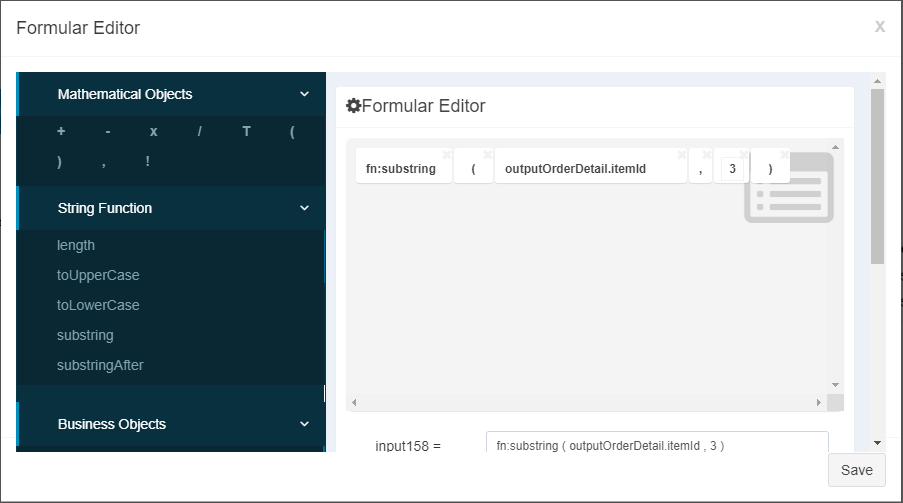
3. The **Formula Editor panel** opens
This editor allows transformation logic to be defined visually.
***
### Formula Editor Capabilities
The **Formula Editor** allows users to construct transformation expressions by:
* Dragging **process parameters** into the editor
* Using **mathematical operators**
* Applying **String functions**
* Combining multiple inputs into a single output expression
The Formula Editor is available **only in the mapping screen**, ensuring that transformation logic remains closely tied to data flow.
***
### Common Data Transformation Scenarios
Data Transformation is commonly used for:
* Formatting strings (for example, concatenation or trimming)
* Applying arithmetic calculations
* Building composite values from multiple parameters
* Converting data shapes between systems
* Normalizing values before persistence or service calls
These transformations allow systems with different data contracts to interoperate cleanly.
***
### Best Practices for Data Transformation
To maintain clarity and reliability:
* Keep transformation logic **simple and readable**
* Avoid embedding complex business logic in formulas
* Use Microflow or Java Node for advanced transformations
* Clearly name parameters to reflect transformed meaning
* Validate transformation outputs during testing
Well‑designed transformations improve integration robustness and reduce runtime errors.
***
### Summary
**Data Transformation** in ONEWEB allows developers to modify data values during parameter mapping using a visual, formula‑based approach.
With Data Transformation, applications can:
* Apply calculations and string operations inline
* Adapt data between different system contracts
* Keep transformation logic close to data flow
* Avoid unnecessary custom code for simple conversions
Together with **Data Mapping**, Data Transformation completes ONEWEB’s visual integration model, enabling **flexible, readable, and maintainable data flow across systems**.
---
# Agent Instructions: Querying This Documentation
If you need additional information that is not directly available in this page, you can query the documentation dynamically by asking a question.
Perform an HTTP GET request on the current page URL with the `ask` query parameter:
```
GET https://docs.onewebstack.com/oneweb-platform-th/building-apps/integrations/develop-integration-with-oneweb-microflow/data-transformation.md?ask=
```
The question should be specific, self-contained, and written in natural language.
The response will contain a direct answer to the question and relevant excerpts and sources from the documentation.
Use this mechanism when the answer is not explicitly present in the current page, you need clarification or additional context, or you want to retrieve related documentation sections.