# Work Party
A **Work Party** represents a **group of users or roles** responsible for performing **Human Tasks** within a business process.\
It is the primary mechanism used by **Process Designer** to assign work to the appropriate people when a process reaches a **Human Task**.
A Work Party can be compared to a **department or functional group**, where:
* The **Work Party** represents the department
* The **Members** represent users or roles within that department
***
### Purpose of Work Party
Work Parties are used to:
* Assign Human Tasks to specific roles or users
* Define responsibility and ownership of activities
* Support role‑based task allocation
* Integrate with **Lanes** to visually represent responsibility
* Enable flexible reassignment and escalation
When a process reaches a Human Task, Process Designer uses **Work Party assignments** to determine **who should receive and act on the task**.
***
### Relationship Between Work Party and Lane
In Process Designer:
* Each **Lane** represents a logical owner of activities (e.g. a role or department)
* Lanes should be created **before dragging nodes** onto the diagram
* Every activity node must belong to a **specific Lane**
* Each Lane is associated with a **Work Party**
#### Default Behavior
* When a **Human Task** is placed inside a Lane
* And that Lane is linked to a Work Party
* The Human Task is **automatically assigned** to that Work Party
#### Custom Assignment
Users can override the default behavior and:
* Assign a Human Task to a **different Work Party**
* Assign it to a **specific user** from another Work Party
This provides both **visual clarity** and **flexible task assignment control**.
***
### Work Party Properties
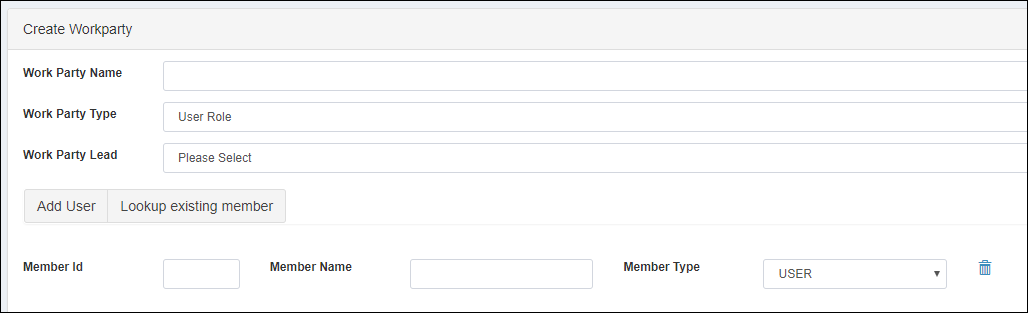
The image below shows the Work Party configuration screen.
#### Work Party Attributes
| Property | Mandatory | Description |
| --------------- | --------- | -------------------------------------------------------------- |
| Work Party Name | Yes | Name of the work party |
| Work Party Type | Yes | Type of work party (currently only **User Role** is supported) |
| Work Party Lead | No | Determines the supervisor or manager role for the work party |
The **Work Party Lead** is commonly used for escalation scenarios or approval hierarchies.
***
### Work Party Members
After creating a Work Party, users must define its **Members**.
Members can be:
* Individual users
* Roles (role‑based membership)
#### Member Attributes
| Property | Mandatory | Description |
| ----------- | --------- | ------------------------------------ |
| Member ID | Yes | Identifier of the member |
| Member Name | Yes | Name of the member |
| Member Type | Yes | Type of member: **USER** or **ROLE** |
***
### Lookup Existing Members
The **Lookup Existing Member** button is available on both:
* **Create Work Party** page
* **Update Work Party** page
This feature allows users to:
* Search and select users from the existing user list
* Avoid manual re‑entry of member details
* Maintain consistency across Work Parties
***
### Usage Guidelines
* Define Work Parties early during process modeling
* Align Work Parties with organizational roles or departments
* Keep Work Party names clear and descriptive
* Always associate Lanes with appropriate Work Parties
* Use Work Party Lead for escalation and supervisory flows
* Avoid overly large Work Parties if fine‑grained control is needed
***
### Summary
The **Work Party** is a core concept for **task ownership and responsibility** in ONEWEB Process Designer.
Key points:
* Represents a group of users or roles
* Used to assign Human Tasks
* Closely integrated with Lanes
* Supports default and custom task assignments
* Enables role‑based and user‑based workflows
Correct configuration of Work Parties ensures that Human Tasks are **delivered to the right people**, making business processes **clear, efficient, and operationally accurate**.
---
# Agent Instructions: Querying This Documentation
If you need additional information that is not directly available in this page, you can query the documentation dynamically by asking a question.
Perform an HTTP GET request on the current page URL with the `ask` query parameter:
```
GET https://docs.onewebstack.com/designer-reference/process-designer/process-designer-component/work-party.md?ask=
```
The question should be specific, self-contained, and written in natural language.
The response will contain a direct answer to the question and relevant excerpts and sources from the documentation.
Use this mechanism when the answer is not explicitly present in the current page, you need clarification or additional context, or you want to retrieve related documentation sections.