# Mobile Pages

When designing **Mobile Pages**, Page Designer provides a dedicated set of **menu controls** optimized for **mobile layouts, touch interaction, and mobile‑specific features**.

Compared to Web Pages, Mobile Page Designer includes additional controls such as **Database Collections** and **Theme Designer**, and provides mobile‑specific preview and interaction options.

***

### Left‑Side Menu Controls (Mobile Pages)

For Mobile Applications, Page Designer provides **9 main menu icons** on the left side of the design canvas.

The available menu controls are:

| Icon                                                                                                                                                                                                                                                                                                                                                            | Menu                     | Description                             |
| --------------------------------------------------------------------------------------------------------------------------------------------------------------------------------------------------------------------------------------------------------------------------------------------------------------------------------------------------------------- | ------------------------ | --------------------------------------- |
| ![](https://docs.oneweb.tech/oneweb/~gitbook/image?url=https%3A%2F%2F2015371994-files.gitbook.io%2F%7E%2Ffiles%2Fv0%2Fb%2Fgitbook-x-prod.appspot.com%2Fo%2Fspaces%252FMpDjHWFRUtZ5nJcSfVXd%252Fuploads%252FEpiGnWvC0s3tZwsYapcs%252F0%3Falt%3Dmedia\&width=300\&dpr=3\&quality=100\&sign=7db932b9\&sv=2)                                                        | **Add Components**       | Add mobile UI components                |
| ![](https://docs.oneweb.tech/oneweb/~gitbook/image?url=https%3A%2F%2F2015371994-files.gitbook.io%2F%7E%2Ffiles%2Fv0%2Fb%2Fgitbook-x-prod.appspot.com%2Fo%2Fspaces%252FMpDjHWFRUtZ5nJcSfVXd%252Fuploads%252FSbdUDmAQxhVadAmHbTxp%252Fimage.png%3Falt%3Dmedia%26token%3D7f526c48-e54c-4d96-85f6-b3067228dc47\&width=40\&dpr=3\&quality=100\&sign=e0b962d8\&sv=2)  | **UI Kits**              | Use reusable or custom UI components    |
| ![](https://docs.oneweb.tech/oneweb/~gitbook/image?url=https%3A%2F%2F2015371994-files.gitbook.io%2F%7E%2Ffiles%2Fv0%2Fb%2Fgitbook-x-prod.appspot.com%2Fo%2Fspaces%252FMpDjHWFRUtZ5nJcSfVXd%252Fuploads%252Fiba08iNiru8xXdGAGy7O%252F1%3Falt%3Dmedia\&width=300\&dpr=3\&quality=100\&sign=145e5826\&sv=2)                                                        | **Open Tools**           | Configure logic, data flow, and scripts |
| ![](https://docs.oneweb.tech/oneweb/~gitbook/image?url=https%3A%2F%2F2015371994-files.gitbook.io%2F%7E%2Ffiles%2Fv0%2Fb%2Fgitbook-x-prod.appspot.com%2Fo%2Fspaces%252FMpDjHWFRUtZ5nJcSfVXd%252Fuploads%252FrjCx4mYsOBhJ4q0yvuZn%252Fimage.png%3Falt%3Dmedia%26token%3Ddec0669b-214a-400e-82eb-27729425d843\&width=300\&dpr=3\&quality=100\&sign=ce19717a\&sv=2) | **Pages**                | Manage mobile pages                     |
| ![](https://docs.oneweb.tech/oneweb/~gitbook/image?url=https%3A%2F%2F2015371994-files.gitbook.io%2F%7E%2Ffiles%2Fv0%2Fb%2Fgitbook-x-prod.appspot.com%2Fo%2Fspaces%252FMpDjHWFRUtZ5nJcSfVXd%252Fuploads%252FJ7PMcxC9MRfRppADtDj7%252Fimage.png%3Falt%3Dmedia%26token%3Dd3a2baca-e47c-4ab4-98dc-6734f99067b6\&width=46\&dpr=3\&quality=100\&sign=a83194e4\&sv=2)  | **Structure**            | View page content structure             |
| ![](https://docs.oneweb.tech/oneweb/~gitbook/image?url=https%3A%2F%2F2015371994-files.gitbook.io%2F%7E%2Ffiles%2Fv0%2Fb%2Fgitbook-x-prod.appspot.com%2Fo%2Fspaces%252FMpDjHWFRUtZ5nJcSfVXd%252Fuploads%252Fw7XZDFZM8vLwFUyeORJS%252F2%3Falt%3Dmedia\&width=300\&dpr=3\&quality=100\&sign=d0437599\&sv=2)                                                        | **Upload Image**         | Upload and manage images                |
| ![](https://docs.oneweb.tech/oneweb/~gitbook/image?url=https%3A%2F%2F2015371994-files.gitbook.io%2F%7E%2Ffiles%2Fv0%2Fb%2Fgitbook-x-prod.appspot.com%2Fo%2Fspaces%252FMpDjHWFRUtZ5nJcSfVXd%252Fuploads%252FEE1eDdYDk3xGX5k1XGzB%252F3%3Falt%3Dmedia\&width=300\&dpr=3\&quality=100\&sign=fbf3ce3\&sv=2)                                                         | **Manage Icon**          | Upload and manage icons                 |
| ![](https://docs.oneweb.tech/oneweb/~gitbook/image?url=https%3A%2F%2F2015371994-files.gitbook.io%2F%7E%2Ffiles%2Fv0%2Fb%2Fgitbook-x-prod.appspot.com%2Fo%2Fspaces%252FMpDjHWFRUtZ5nJcSfVXd%252Fuploads%252FksfrfM6WZMOKBrCj90xc%252F4%3Falt%3Dmedia\&width=300\&dpr=3\&quality=100\&sign=db2c7918\&sv=2)                                                        | **Database Collections** | Create local mobile databases           |
| ![](https://docs.oneweb.tech/oneweb/~gitbook/image?url=https%3A%2F%2F2015371994-files.gitbook.io%2F%7E%2Ffiles%2Fv0%2Fb%2Fgitbook-x-prod.appspot.com%2Fo%2Fspaces%252FMpDjHWFRUtZ5nJcSfVXd%252Fuploads%252FQenKkZNOPGjO3v92c5hQ%252F6%3Falt%3Dmedia\&width=300\&dpr=3\&quality=100\&sign=50a01158\&sv=2)                                                        | **Theme Designer**       | Configure mobile themes                 |

***

### Add Components (Mobile)

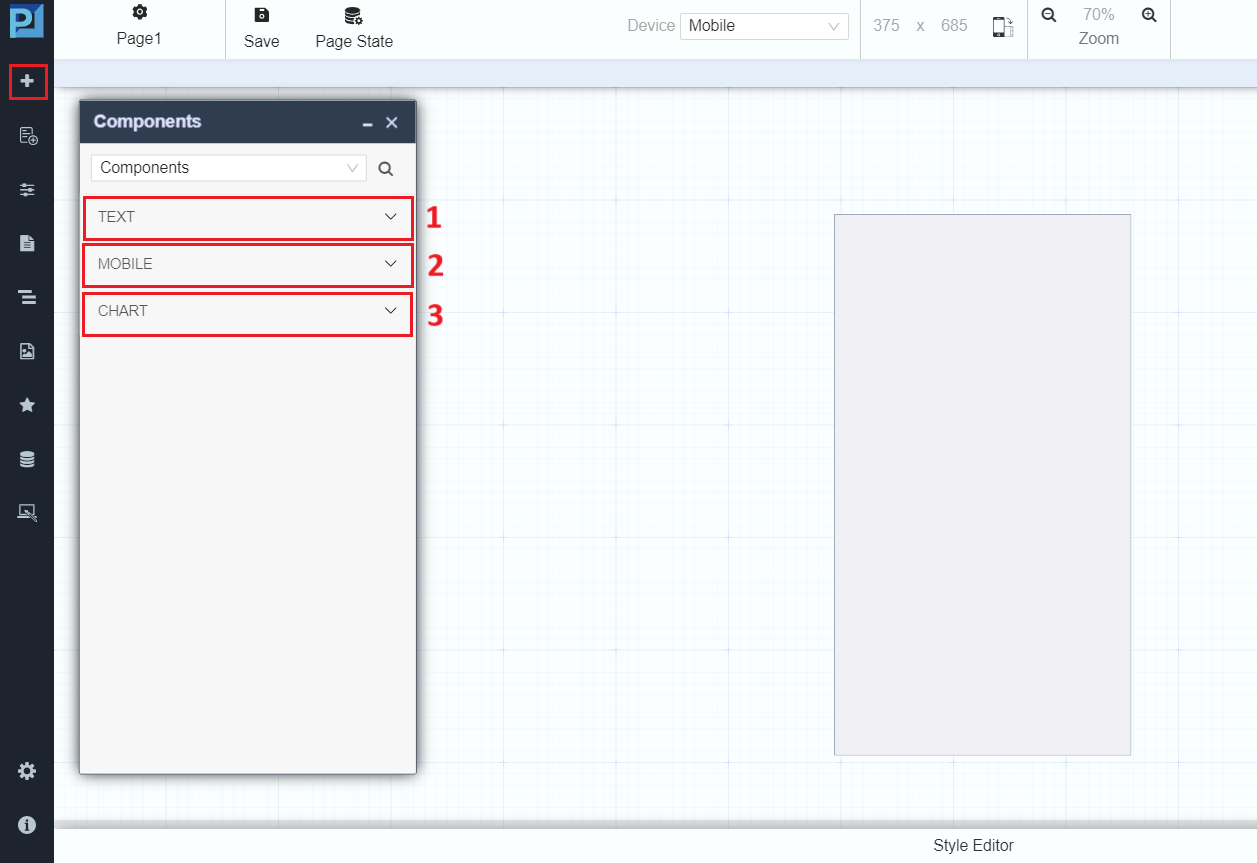
Click the **Add Components** icon ![](https://docs.oneweb.tech/oneweb/~gitbook/image?url=https%3A%2F%2F2015371994-files.gitbook.io%2F%7E%2Ffiles%2Fv0%2Fb%2Fgitbook-x-prod.appspot.com%2Fo%2Fspaces%252FMpDjHWFRUtZ5nJcSfVXd%252Fuploads%252FEpiGnWvC0s3tZwsYapcs%252F0%3Falt%3Dmedia\&width=300\&dpr=3\&quality=100\&sign=7db932b9\&sv=2) to open the mobile Components panel.

The components panel appears in the properties section.

<figure><img src="https://2015371994-files.gitbook.io/~/files/v0/b/gitbook-x-prod.appspot.com/o/spaces%2FMpDjHWFRUtZ5nJcSfVXd%2Fuploads%2FL1Svr9hu3ATc0juGhMJd%2Fadd-componentMobile.png?alt=media" alt=""><figcaption></figcaption></figure>

#### Component Categories (Mobile)

**TEXT**

* Paragraph
* Simple Text
* Heading
* Label
* Span

**MOBILE**

* Text Area
* Button
* Form
* Input Group
* Radio
* Checkbox
* Container
* Grid
* Card
* Carousel

**CHART**

* Bar
* Line
* Pie
* Area
* Radar

***

### UI Kits (Mobile)

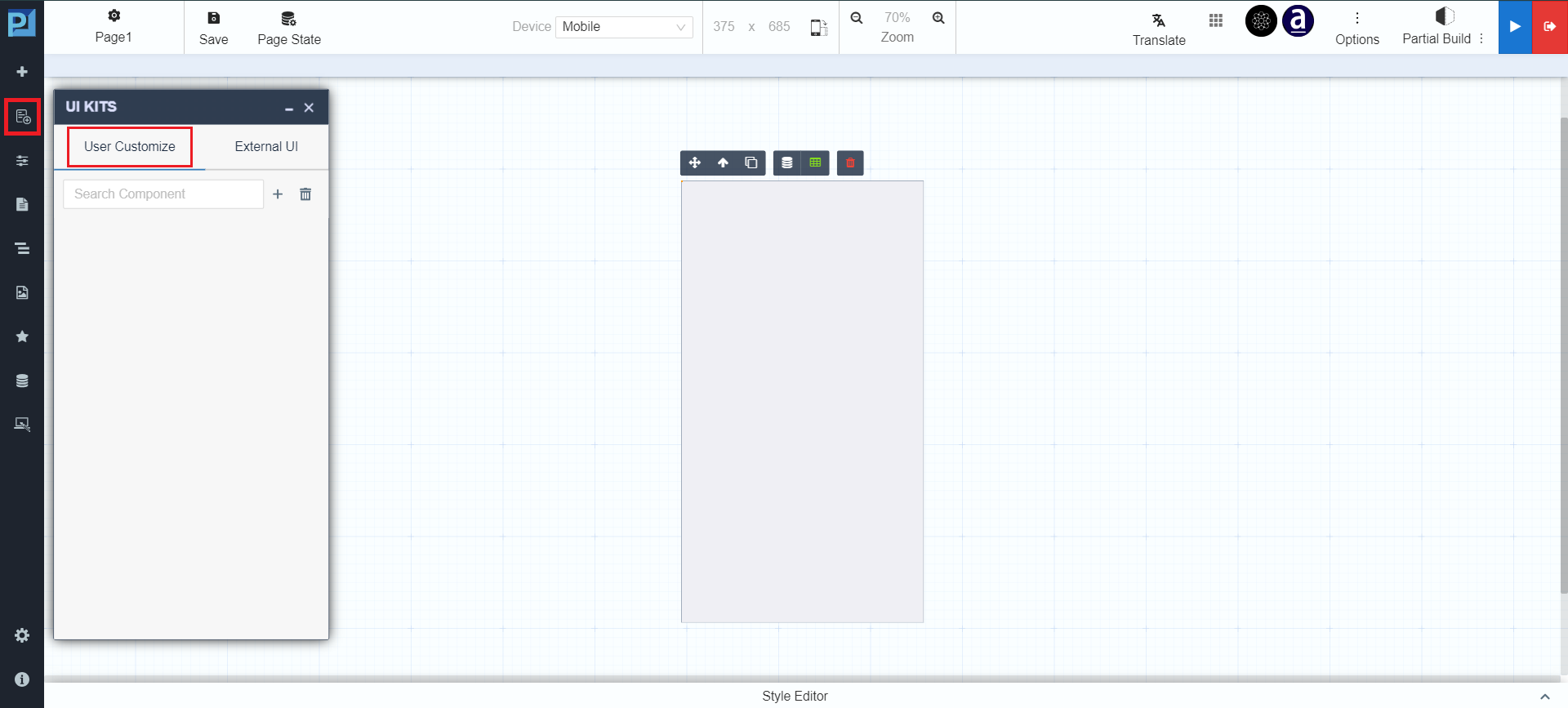
Click the **UI Kits** icon ![](https://docs.oneweb.tech/oneweb/~gitbook/image?url=https%3A%2F%2F2015371994-files.gitbook.io%2F%7E%2Ffiles%2Fv0%2Fb%2Fgitbook-x-prod.appspot.com%2Fo%2Fspaces%252FMpDjHWFRUtZ5nJcSfVXd%252Fuploads%252FSbdUDmAQxhVadAmHbTxp%252Fimage.png%3Falt%3Dmedia%26token%3D7f526c48-e54c-4d96-85f6-b3067228dc47\&width=40\&dpr=3\&quality=100\&sign=e0b962d8\&sv=2) to open reusable UI component libraries.

#### User Customize UI Kits (Mobile)

<figure><img src="https://2015371994-files.gitbook.io/~/files/v0/b/gitbook-x-prod.appspot.com/o/spaces%2FMpDjHWFRUtZ5nJcSfVXd%2Fuploads%2F0bogiNirB7LBUyEhVgTb%2FUI-kits-UC-mobile.png?alt=media" alt=""><figcaption></figcaption></figure>

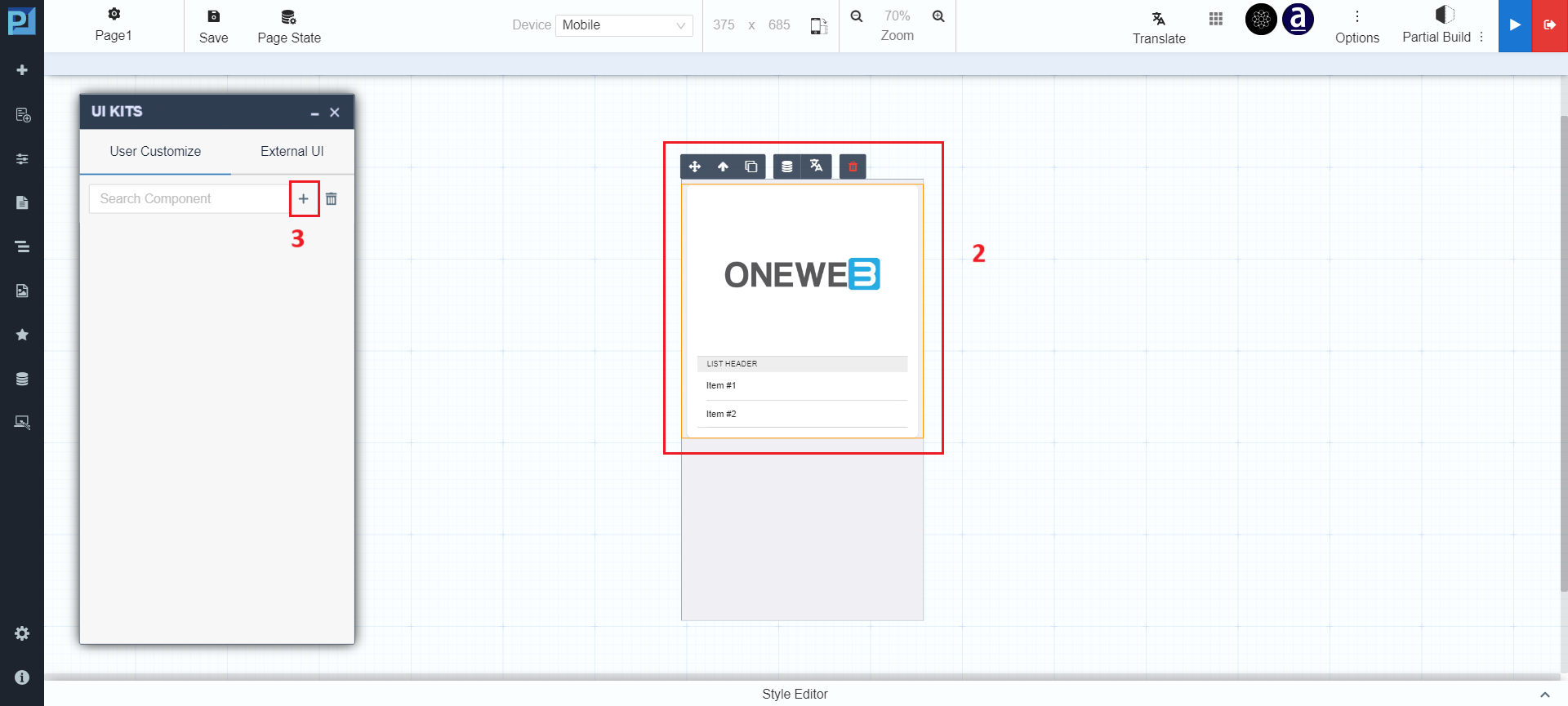
Add a component using the ![](https://docs.oneweb.tech/oneweb/~gitbook/image?url=https%3A%2F%2F2015371994-files.gitbook.io%2F%7E%2Ffiles%2Fv0%2Fb%2Fgitbook-x-prod.appspot.com%2Fo%2Fspaces%252FMpDjHWFRUtZ5nJcSfVXd%252Fuploads%252FEpiGnWvC0s3tZwsYapcs%252F0%3Falt%3Dmedia\&width=300\&dpr=3\&quality=100\&sign=7db932b9\&sv=2) **icon**:

<figure><img src="https://2015371994-files.gitbook.io/~/files/v0/b/gitbook-x-prod.appspot.com/o/spaces%2FMpDjHWFRUtZ5nJcSfVXd%2Fuploads%2FYcfrcb0Py29XC3nboxyk%2FUI-kits-UC-mobile2.png?alt=media" alt=""><figcaption></figcaption></figure>

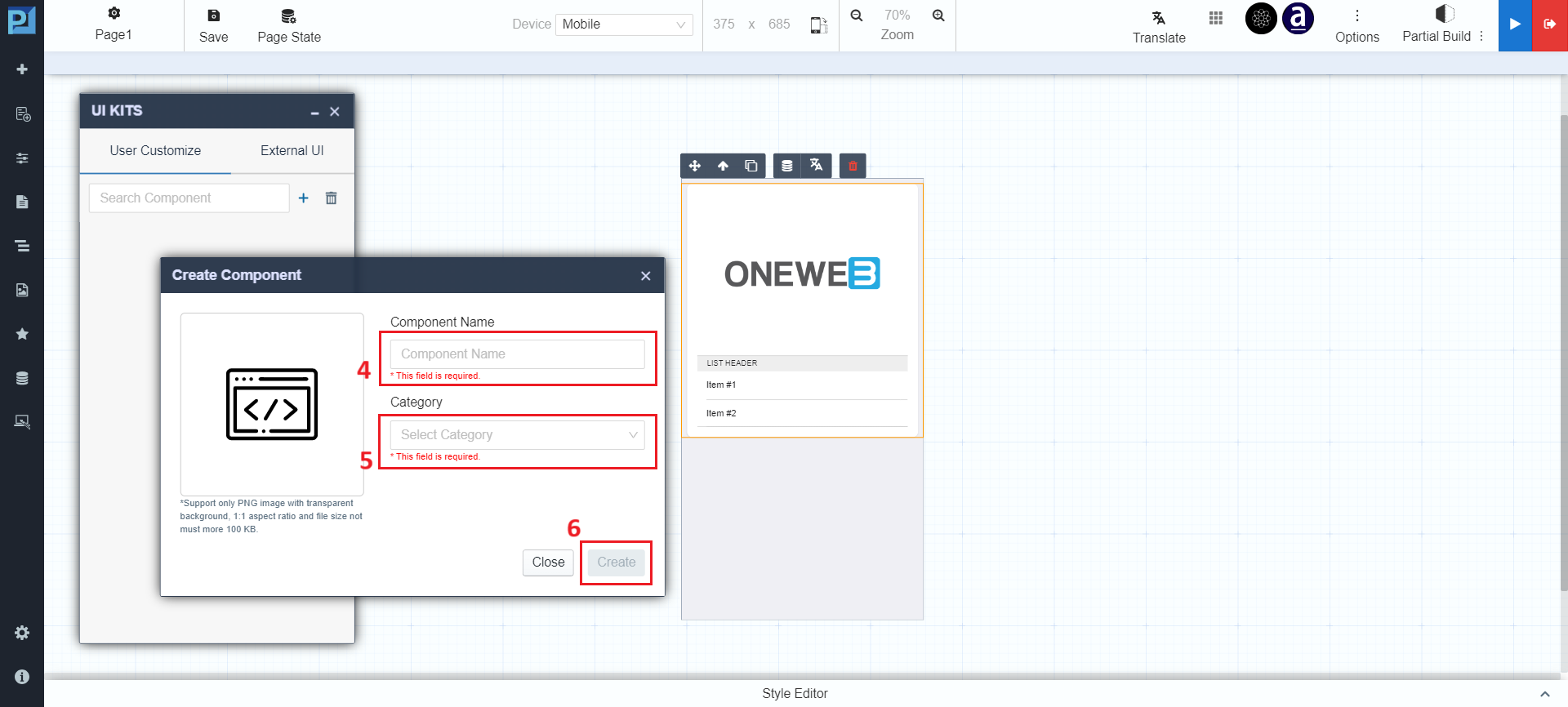
Create and save the component:

<figure><img src="https://2015371994-files.gitbook.io/~/files/v0/b/gitbook-x-prod.appspot.com/o/spaces%2FMpDjHWFRUtZ5nJcSfVXd%2Fuploads%2FkJdsfbRZV67TsSvHm6bo%2FUI-kits-UC-mobile3.png?alt=media" alt=""><figcaption></figcaption></figure>

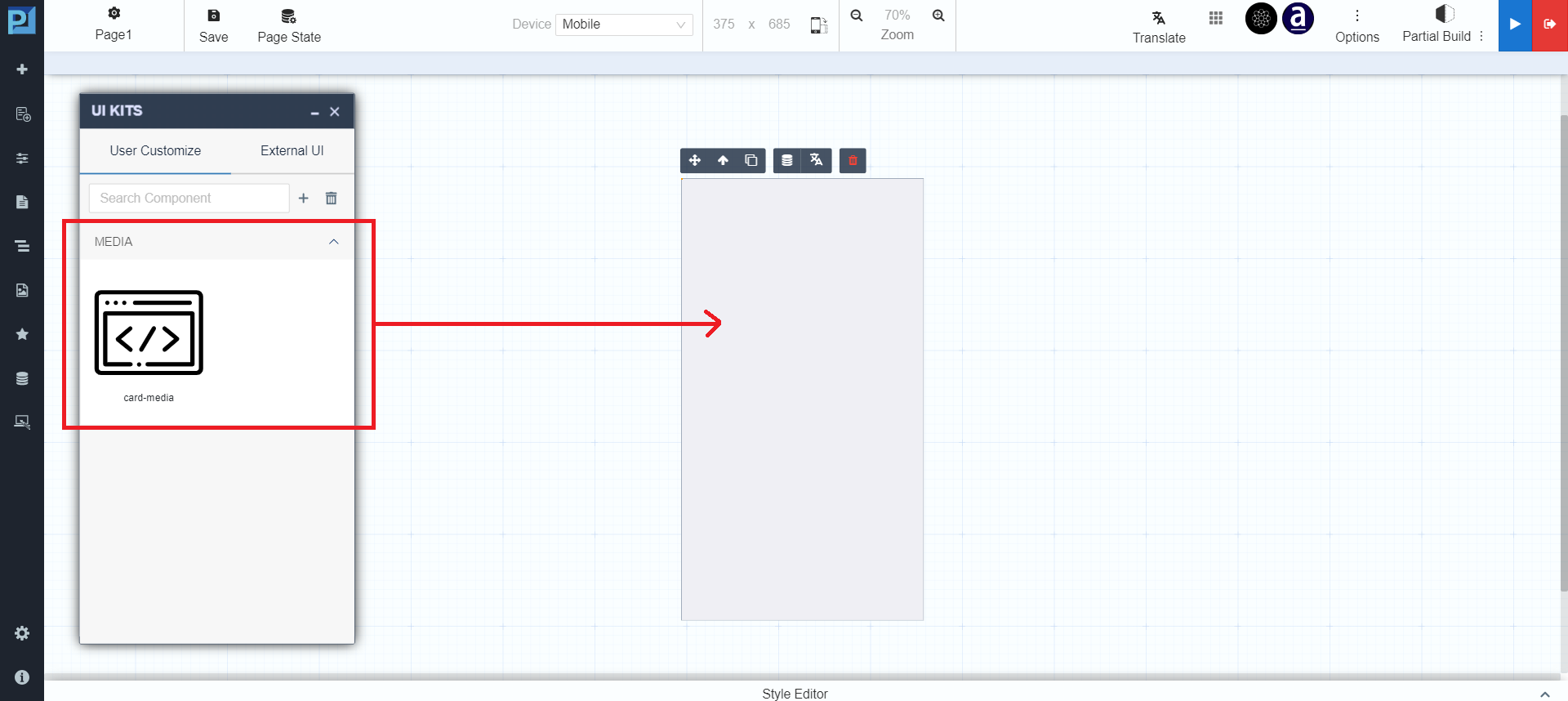
Reusable via drag & drop:

<figure><img src="https://2015371994-files.gitbook.io/~/files/v0/b/gitbook-x-prod.appspot.com/o/spaces%2FMpDjHWFRUtZ5nJcSfVXd%2Fuploads%2FMDxhI0jIYREdwtnmTf04%2FUI-kits-UC-mobile4.png?alt=media" alt=""><figcaption></figcaption></figure>

***

### Database Collections

Database Collections allow creation of a **local database** available only to the mobile application.

This feature is commonly used with:

* Interaction settings
* Data Flow configuration

📌 See also: **Local Storage in Page**

***

### Open Tools (Mobile)

Open Tools provides logic and behavior configuration for mobile pages.

#### Available Tools

* **Database** – Integrate with local mobile database
* **Microflow** – Bind events with Microflow services
* **JavaScript** – Add custom client logic
* **Properties** – Configure ID, title, CSS class
* **Style** – Fonts, size, borders, background, links

***

### Pages (Mobile)

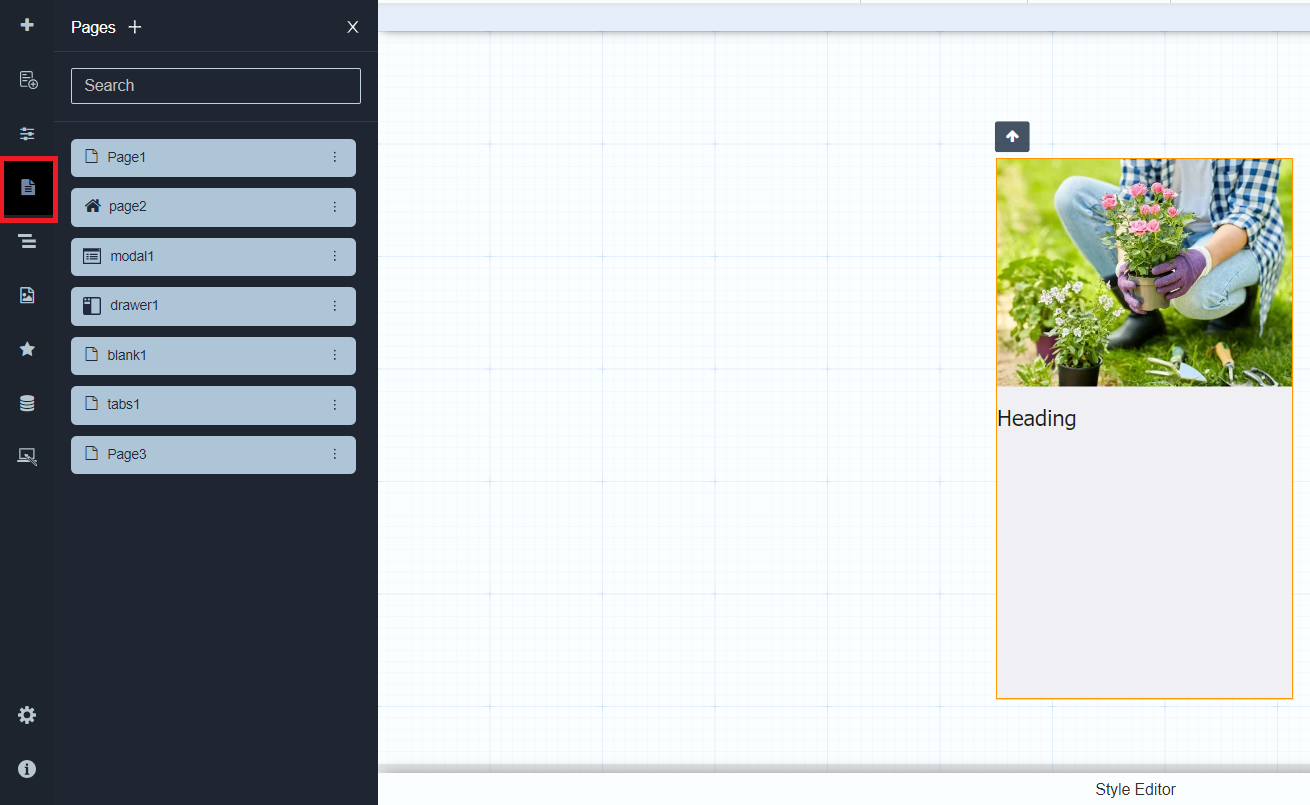
The Pages menu shows all mobile pages in the app.

<figure><img src="https://2015371994-files.gitbook.io/~/files/v0/b/gitbook-x-prod.appspot.com/o/spaces%2FMpDjHWFRUtZ5nJcSfVXd%2Fuploads%2F93UvuiTUOLQ4UCXNoC6y%2FPagesMobile.png?alt=media" alt=""><figcaption></figcaption></figure>

Users can:

* Search pages
* Create new pages
* Close the pages panel

***

### Structure (Mobile)

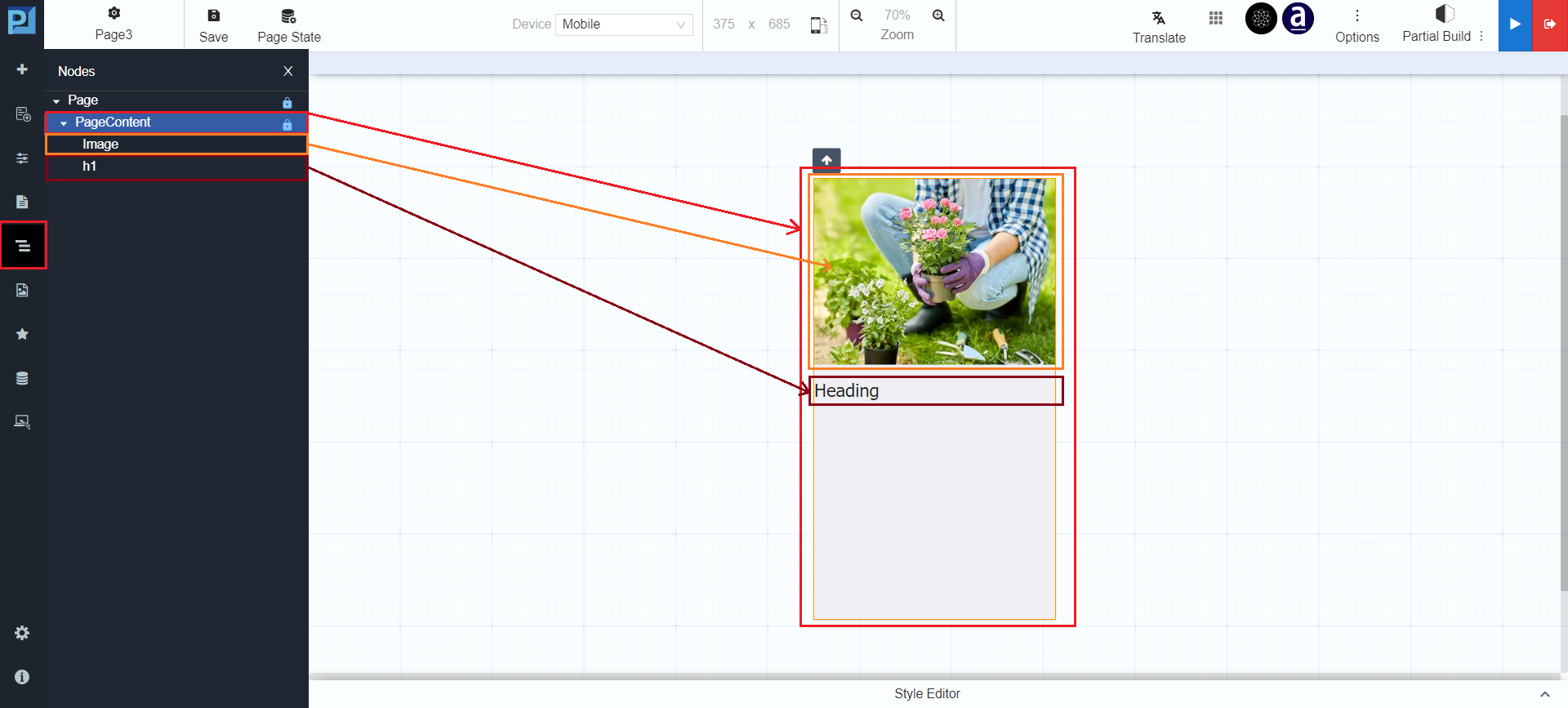
Structure displays a hierarchical view of mobile page content.

<figure><img src="https://2015371994-files.gitbook.io/~/files/v0/b/gitbook-x-prod.appspot.com/o/spaces%2FMpDjHWFRUtZ5nJcSfVXd%2Fuploads%2Fy12fKAtY6Dg7R4ooOrHO%2FstructureMobile.png?alt=media" alt=""><figcaption></figcaption></figure>

***

### Upload Image (Mobile)

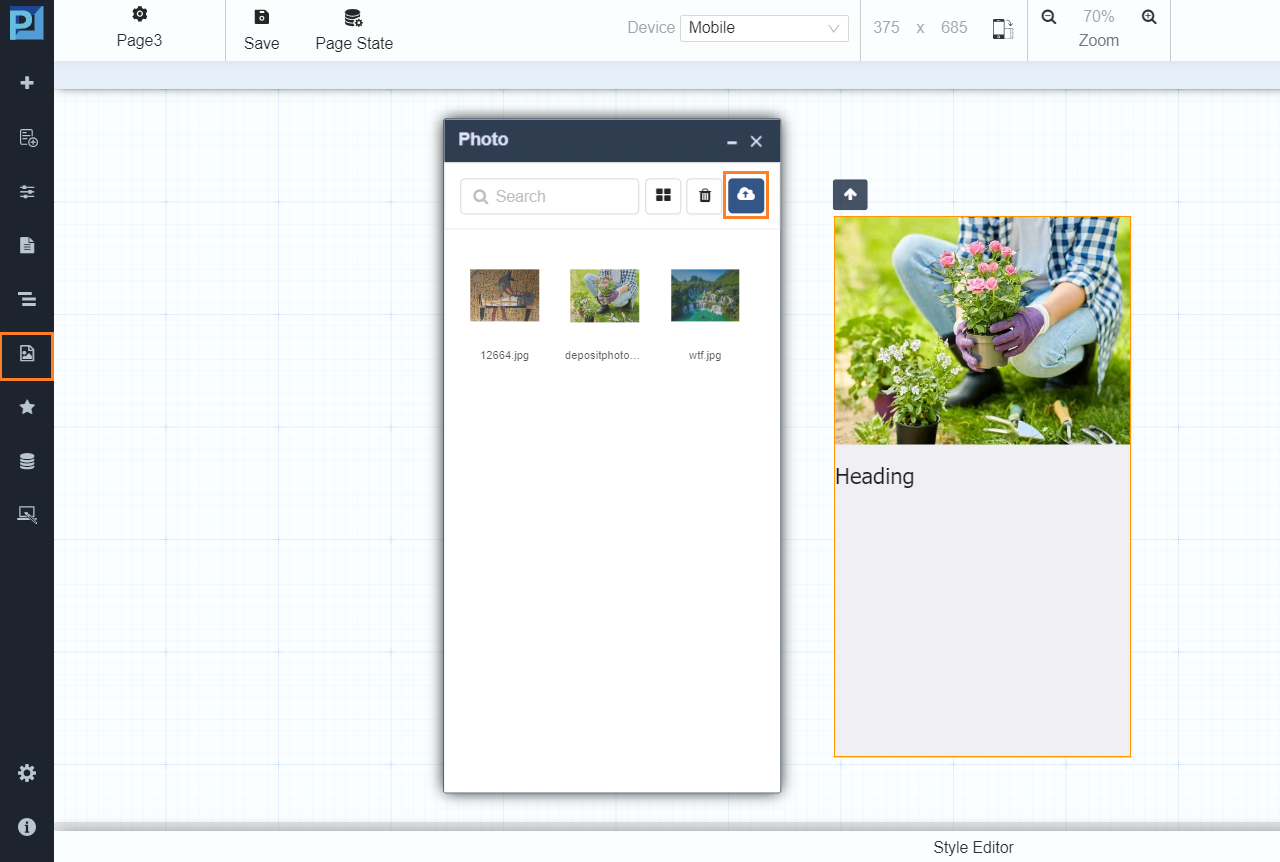
Allows uploading images for mobile pages.

<figure><img src="https://2015371994-files.gitbook.io/~/files/v0/b/gitbook-x-prod.appspot.com/o/spaces%2FMpDjHWFRUtZ5nJcSfVXd%2Fuploads%2FGBESJ2FQzKRTzFdegV56%2FuploadIMGmobile.png?alt=media" alt=""><figcaption></figcaption></figure>

Images can be reused and applied as:

* Page content
* Background images for containers

***

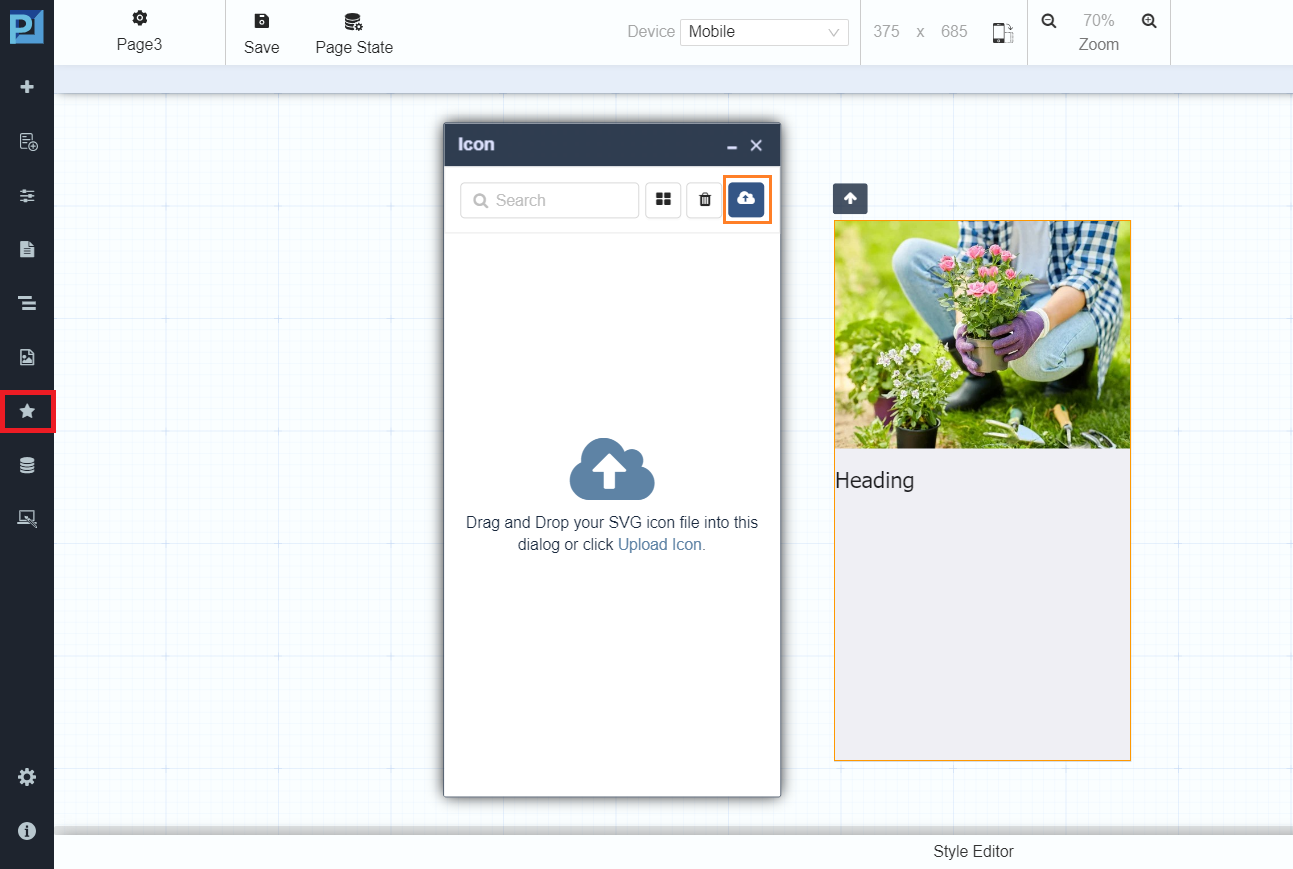
### Manage Icon (Mobile)

Upload and reuse custom icons.

<figure><img src="https://2015371994-files.gitbook.io/~/files/v0/b/gitbook-x-prod.appspot.com/o/spaces%2FMpDjHWFRUtZ5nJcSfVXd%2Fuploads%2FewiME7kjgPrdnamxqVq4%2FmanageIconMobile.png?alt=media" alt=""><figcaption></figcaption></figure>

***

### Summary

This **Mobile Pages** section describes all menu controls under:

> **Menu Controls on Pages → Mobile Pages**

These controls enable users to:

* Design mobile‑friendly layouts
* Reuse UI components
* Bind data and workflows
* Configure themes and local databases
* Preview mobile behavior effectively

Together with **Web Pages**, this completes the full reference for **Menu Controls on Pages** in Page Designer.


---

# Agent Instructions: Querying This Documentation

If you need additional information that is not directly available in this page, you can query the documentation dynamically by asking a question.

Perform an HTTP GET request on the current page URL with the `ask` query parameter:

```
GET https://docs.onewebstack.com/designer-reference/page-designer/menu-controls-on-pages/mobile-pages.md?ask=<question>
```

The question should be specific, self-contained, and written in natural language.
The response will contain a direct answer to the question and relevant excerpts and sources from the documentation.

Use this mechanism when the answer is not explicitly present in the current page, you need clarification or additional context, or you want to retrieve related documentation sections.