# Reusing Module
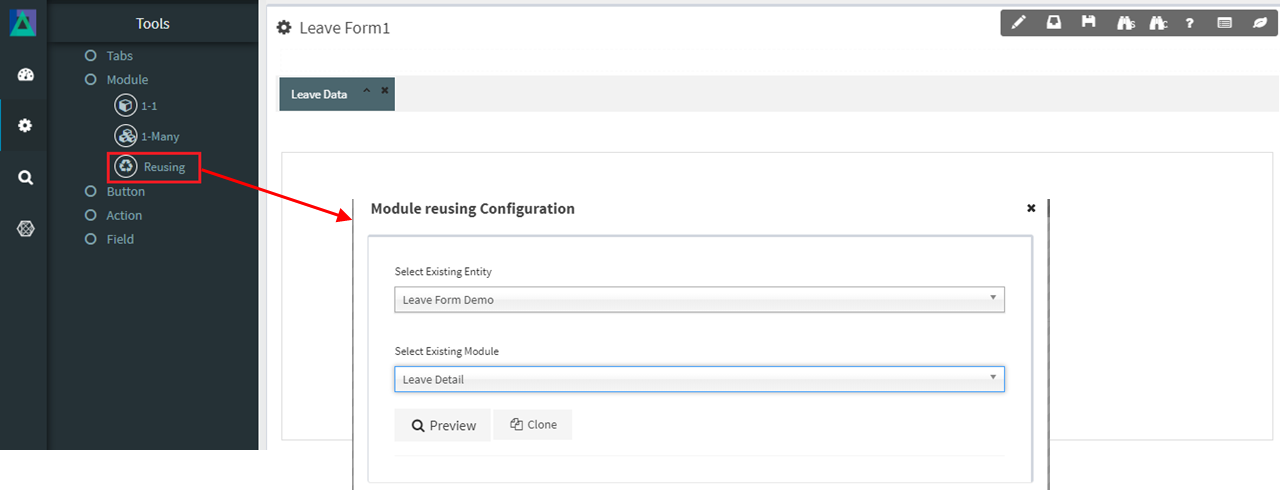
The **Reusing Module** allows users to **reuse an existing module from another Entity** and copy it into the current Smart Form.\
This feature helps reduce duplication of work when similar or identical module designs are required across multiple entities.
Instead of creating a new module from scratch, designers can reuse a previously configured module and apply it directly to a new Entity.
***
### Purpose of Reusing Module
The Reusing Module is designed to:
* Save time in Smart Form design
* Promote consistency across multiple entities
* Reduce configuration and maintenance effort
* Encourage reuse of proven module designs
* Avoid duplication of similar UI and database logic
It is especially useful when:
* Multiple entities share similar structures (e.g. Address, Contact Details)
* Standard data sections are repeated across forms
* UI and database mapping logic should remain consistent
***
### How Reusing Module Works
A Reusing Module is created by **copying an existing module** from another Entity into the current Smart Form.
Key characteristics:
* The reused module retains its **original module type**
* The copied module behaves exactly like its original version
* Designers can further modify the copied module if needed
> The reuse mechanism affects **only how the module is created**, not how it behaves or is configured afterward.
***
### Module Configuration Behavior
The **Module Configuration of a Reusing Module is identical** to that of the original module type.
Specifically:
* If the original module is a **1–1 Module**\
→ The Reusing Module follows **1–1 Module configuration rules**
* If the original module is a **1–Many Module**\
→ The Reusing Module follows **1–Many Module configuration rules**
All properties, layout behavior, and database mapping options remain the same as the source module.
***
### Creating a Reusing Module
To create a Reusing Module:
1. Select **Reusing Module** from the Module options
2. Choose an existing module from another Entity
3. Copy the module into the current Smart Form
4. Adjust layout or configuration if required
Once copied, the module becomes part of the current Entity and can be managed like any other module.
***
### Usage Guidelines
* Use Reusing Module for **common or shared form sections**
* Ensure the source module is well‑designed before reuse
* Review database table mapping after reuse
* Rename the module if needed to match the new context
* Avoid deep dependency chains between entities
* Verify data behavior after copying into a new entity
***
### Summary
The **Reusing Module** provides an efficient way to reuse existing module designs across entities.
Key points:
* Copies modules from other entities into a Smart Form
* Saves time and reduces duplication
* Ensures UI and data consistency
* Supports both **1–1** and **1–Many** modules
* Configuration behavior matches the original module type
Using Reusing Modules correctly helps teams build **consistent, maintainable, and scalable Smart Forms** across the ONEWEB platform.
---
# Agent Instructions: Querying This Documentation
If you need additional information that is not directly available in this page, you can query the documentation dynamically by asking a question.
Perform an HTTP GET request on the current page URL with the `ask` query parameter:
```
GET https://docs.onewebstack.com/designer-reference/app-designer/entity/create-new-entity/module/reusing-module.md?ask=
```
The question should be specific, self-contained, and written in natural language.
The response will contain a direct answer to the question and relevant excerpts and sources from the documentation.
Use this mechanism when the answer is not explicitly present in the current page, you need clarification or additional context, or you want to retrieve related documentation sections.