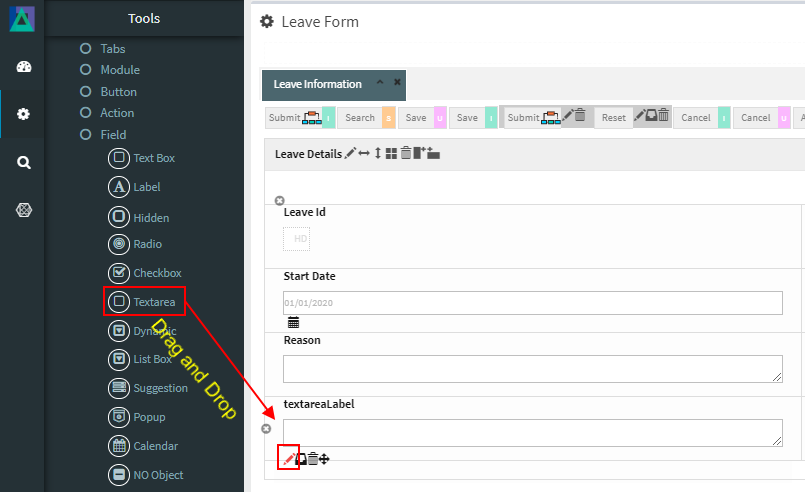
# Text Area
The **Text Area** field is an input component used to capture **long text values**, typically **more than 100 characters**.\
It is suitable for free‑form or descriptive input where users need additional space beyond a standard Text Box.
The Text Area supports both **plain text** and **rich text** input, depending on configuration.
***
### Purpose of Text Area Field
The Text Area field is commonly used to:
* Capture long descriptions or remarks
* Collect comments, notes, or explanations
* Store multi‑line text input
* Improve readability for large text content
#### Typical Use Cases
* Description fields
* Comments or feedback
* Justification / Reason text
* Additional notes
***
### Adding and Configuring a Text Area
To add a Text Area field:
1. Drag the **Text Area** field into a Module layout
2. Click the **Edit (pencil) icon** on the field
3. The **Text Area Configuration** window opens
***
### Text Area Configuration Properties
#### 1️. Core Identification
| Property | Mandatory | Description |
| --------- | --------- | ---------------------------------- |
| **MF ID** | Yes | System‑generated unique identifier |
***
#### 2️. Field Behavior & Appearance
| Property | Description |
| ------------------------ | -------------------------------------------------------------- |
| **Row Size** | Number of visible rows in the Text Area (default: 4) |
| **Default Value** | Initial value shown when the form loads |
| **Display as Rich Text** | Enables rich‑text formatting when set to Yes |
| **Source Tag** | Allows JavaScript at field level (e.g. `readonly`, `onchange`) |
***
#### 3️. Database Mapping
| Property | Description |
| ------------- | ------------------------------------ |
| **Field\_ID** | Database column mapped to this field |
***
#### 4️. Display & Search Configuration
| Property | Description |
| --------------------- | -------------------------------------------------------- |
| **ShowFieldName** | Label displayed on the screen (auto‑generated supported) |
| **SearchCriteria** | Enables this field as search criteria |
| **ShowSearch** | Displays field in search result table |
| **SearchFromTo** | Enables range‑based searching |
| **SearchPreLike** | Enables wildcard `%XXX` search |
| **SearchLike** | Enables wildcard `XXX%` search |
| **SearchIgnoreCase** | Case‑insensitive search |
| **JoinSearchTable** | Used for JOIN‑based search queries |
| **SearchFieldGroup** | Horizontal grouping in search criteria |
| **SearchCriteriaSeq** | Vertical position in search criteria |
| **ShowSearchSeq** | Order in search results |
***
#### 5️. UI & Behavior Flags
| Property | Description |
| --------------- | ----------------------------------------- |
| **Alignment** | Text alignment: Left / Center / Right |
| **OnlyGuiFlag** | UI‑only field (not persisted to database) |
| **ViewFlag** | Displays field in read‑only mode |
| **KeepHistory** | Persists change history in database |
| **FilterFlag** | Filters records in 1‑Many Modules |
| **Authen** | Applies IAM‑based authorization |
| **MergeFlag** | Field spans across multiple columns |
***
#### 6️. Validation Rules (Validate Code)
Validation logic applied before saving form data.
| Code | Description |
| -------------------- | ------------------------------------ |
| `CHECK_NULL` | Prevents saving if the value is null |
| `CHECK_INTEGER` | Ensures integer input |
| `CHECK_DECIMAL` | Ensures decimal input |
| `CHECK_EMAIL_FORMAT` | Validates email format |
***
### Rich Text Support
When **Display as Rich Text** is enabled:
* Users can format content (bold, italic, etc.)
* Useful for detailed descriptions or formatted instructions
* Stored as formatted text based on configuration
***
### Usage Guidelines
* Use Text Area for **long or multi‑line input**
* Avoid using for small values (use Text Box instead)
* Enable Rich Text only when formatting is required
* Choose appropriate `Row Size` for readability
* Consider database column type (CLOB / TEXT)
* Use validation to maintain data quality
***
### Summary
The **Text Area** field is designed for handling **long text input** in ONEWEB Smart Forms.
Key points:
* Supports multi‑line text input
* Optional Rich Text formatting
* Integrated with search, validation, and IAM
* Can persist to database or be UI‑only
* Ideal for descriptions, comments, and notes
Proper use of Text Area fields ensures forms remain **usable, readable, and suitable for real‑world business data entry**.
---
# Agent Instructions: Querying This Documentation
If you need additional information that is not directly available in this page, you can query the documentation dynamically by asking a question.
Perform an HTTP GET request on the current page URL with the `ask` query parameter:
```
GET https://docs.onewebstack.com/designer-reference/app-designer/entity/create-new-entity/fields/text-area.md?ask=
```
The question should be specific, self-contained, and written in natural language.
The response will contain a direct answer to the question and relevant excerpts and sources from the documentation.
Use this mechanism when the answer is not explicitly present in the current page, you need clarification or additional context, or you want to retrieve related documentation sections.