# No Object
The **No Object** field is an input/display component used to show a **custom value on the screen that is not part of the module’s primary database table**.\
It is commonly used to display **derived values, calculated data, or data retrieved from other tables** without tightly binding the field to the module’s table structure.
The No Object field is useful when information needs to be **shown or processed in the UI layer** without being a core attribute of the entity’s table.
***
### Purpose of No Object Field
The No Object field is designed to:
* Display data that does not belong to the module’s table
* Show calculated or derived values
* Display data retrieved from other tables or logic
* Support UI‑only or loosely mapped fields
* Enhance form flexibility without altering the main schema
#### Typical Use Cases
* Displaying computed totals or summaries
* Showing reference information from another entity
* Displaying temporary or contextual values
* UI‑only informational fields
***
### Adding and Configuring a No Object Field
To add a No Object field:
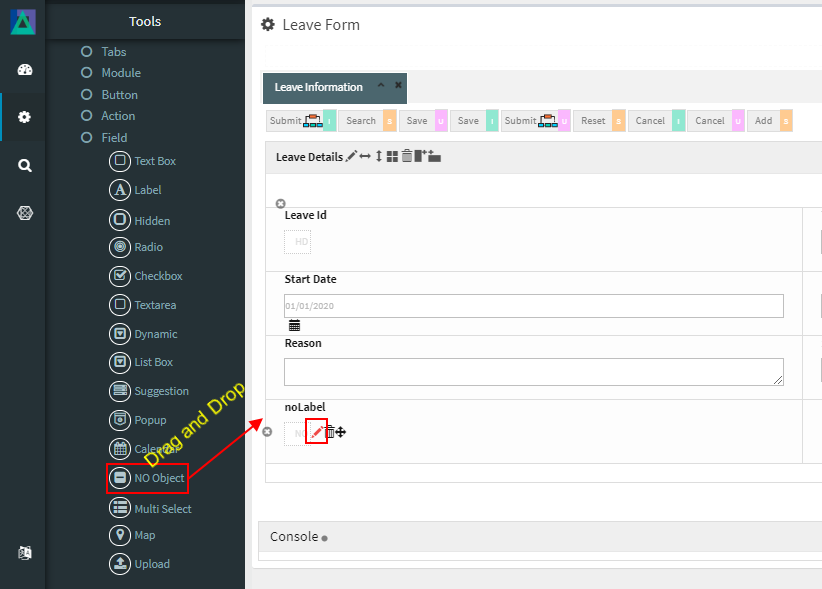
1. Drag the **No Object** field into a Module layout
2. Click the **Edit (pencil) icon** on the field
3. The **No Object Configuration** window opens
***
### No Object Configuration Properties
#### 1️. Core Identification
| Property | Mandatory | Description |
| --------- | --------- | ---------------------------------- |
| **MF ID** | Yes | System‑generated unique identifier |
***
#### 2️. Database Mapping (Optional)
| Property | Description |
| ------------- | ----------------------------------------------------- |
| **Field\_ID** | Database field mapped to this component (if required) |
> **Note**\
> Even though the field type is called *No Object*, it can optionally map to a database field or be configured as UI‑only, depending on use case.
***
#### 3️. Display & Search Configuration
| Property | Description |
| --------------------- | -------------------------------------------------------- |
| **ShowFieldName** | Label displayed on the screen (auto‑generated supported) |
| **SearchCriteria** | Enables field as search criteria |
| **ShowSearch** | Displays field in search result table |
| **SearchFromTo** | Enables range‑based search |
| **SearchPreLike** | Enables wildcard `%XXX` search |
| **SearchLike** | Enables wildcard `XXX%` search |
| **SearchIgnoreCase** | Enables case‑insensitive search |
| **JoinSearchTable** | Used when JOIN SQL is required for search |
| **SearchFieldGroup** | Horizontal position in search criteria |
| **SearchCriteriaSeq** | Vertical position in search criteria |
| **ShowSearchSeq** | Order in search results |
***
#### 4️. UI & Behavior Flags
| Property | Description |
| --------------- | ------------------------------------------------------- |
| **Alignment** | Text alignment: Left / Center / Right |
| **OnlyGuiFlag** | Configures field as UI‑only (not persisted to database) |
| **ViewFlag** | Displays field in read‑only/view mode |
| **KeepHistory** | Persists history of value changes (if mapped) |
| **FilterFlag** | Filters records in 1‑Many Modules |
| **Authen** | Applies IAM‑based authorization |
| **MergeFlag** | Field spans across multiple columns |
***
#### 5️. Validation Rules (Validate Code)
Validation logic applied before saving.
| Code | Description |
| -------------------- | -------------------------------- |
| `CHECK_NULL` | Prevents saving if value is null |
| `CHECK_INTEGER` | Ensures integer value |
| `CHECK_DECIMAL` | Ensures decimal value |
| `CHECK_EMAIL_FORMAT` | Validates email format |
***
### Usage Guidelines
* Use **No Object** when data is **not part of the module’s main table**
* Ideal for calculated or derived display‑only values
* Use `OnlyGuiFlag` for strictly UI‑level fields
* Clearly document the source of displayed data
* Avoid overusing No Object fields to prevent unclear data flow
* Combine with IAM (`Authen`) for role‑specific visibility if needed
***
### Summary
The **No Object** field provides flexibility to display **custom, derived, or external data** within Smart Forms without changing the core database schema.
Key points:
* Not strictly bound to the module’s table
* Can be UI‑only or loosely mapped
* Supports search, validation, and IAM
* Useful for calculated, reference, or contextual data
* Enhances form flexibility and design freedom
When used appropriately, No Object fields help build **rich, informative, and adaptable Smart Forms** in ONEWEB.
---
# Agent Instructions: Querying This Documentation
If you need additional information that is not directly available in this page, you can query the documentation dynamically by asking a question.
Perform an HTTP GET request on the current page URL with the `ask` query parameter:
```
GET https://docs.onewebstack.com/designer-reference/app-designer/entity/create-new-entity/fields/no-object.md?ask=
```
The question should be specific, self-contained, and written in natural language.
The response will contain a direct answer to the question and relevant excerpts and sources from the documentation.
Use this mechanism when the answer is not explicitly present in the current page, you need clarification or additional context, or you want to retrieve related documentation sections.