# Buttons
**Buttons** are interactive components used inside **Smart Forms** to trigger actions.\
They allow users to perform operations such as saving data, searching records, navigating screens, manipulating module data, or invoking business processes and microflows.
In **App Designer**, three types of buttons are supported:
1. **Entity Button**
2. **Module Button**
3. **Process Button**
Each button type differs in **scope, placement, and behavior**.
***
### Entity Button
**Entity Buttons** are used to perform actions at the **entity level** and typically affect the **entire Smart Form**.
#### Purpose
Entity Buttons are commonly used for:
* Saving or canceling entity data
* Searching records
* Navigating between screens
* Approving or rejecting entity data
#### Placement
* Can be dragged and dropped into:
* **Main Tab**
* **Main Module** of the Entity
***
#### Entity Button Configuration
Clicking the **Button Configuration icon**  opens the Entity Button configuration popup.
**Entity Button Properties**
| Property | Mandatory | Description |
| ------------------ | --------- | ------------------------------------------------------------------------------- |
| **Button ID** | Yes | System‑generated unique identifier |
| **Entity\_ID** | Yes | Associated Entity ID (auto‑assigned) |
| **buttonName** | Yes | Display name of the button |
| **Sequence** | Yes | Display order of buttons on the screen |
| **Button Type** | Yes | Type of HTML button |
| **Page Action** | Yes | Defines where button appears: `ENTITY_SEARCH`, `ENTITY_INSERT`, `ENTITY_UPDATE` |
| **Button Action** | Yes | Function executed when the button is clicked |
| **Authentication** | No | Enables IAM authorization check |
| **styleClass** | Yes | CSS class applied to the button |
| **sourceTag** | No | Custom HTML / JS styling |
| **imgFlag** | No | Displays button as an image |
***
#### Built‑in Entity Button Actions
ONEWEB provides the following built‑in entity actions:
* `searchResult()` – Search records
* `resetSearchCriteria()` – Reset search fields
* `addEntity()` – Open insert screen
* `cancelEntity()` – Cancel current screen
* `deleteEntity()` – Delete record
* `viewHistory()` – View history
* `saveEntity()` – Save entity data
> **Note:**\
> You may replace built‑in actions with **custom JavaScript functions** if needed.
***
#### Delete Entity Button
 - An entity button can be removed from the Smart Form using the **Delete Button icon**.
***
### 2️. Module Button
**Module Buttons** are used to perform actions **within a specific module**, usually a **1‑Many module**.
#### Purpose
Module Buttons are commonly used to:
* Add, update, or delete rows in a module
* Import or export module data
* Open module‑specific popups
* Copy module records
#### Scope
* Limited to the **module level**
* Does **not affect the entire entity**
***
#### Module Button Actions
Module Buttons share most configuration properties with Entity Buttons, but use **module‑specific actions**.
**Built‑in Module Button Actions**
* `[MODULE_ID]Delete()` – Delete module record
* `[MODULE_ID]Copy()` – Copy module record
* `actionFormSubmitOnTable('insertMany','Y')`
* `actionFormSubmit('insertMany','Y')`
* `[MODULE_ID]ImportExcel()` – Import Excel
* `[MODULE_ID]ExportExcel()` – Export to Excel
* `$('#many_[MODULE_ID]_dialog').close()` – Close module popup
* `popupList('[POPUP_ENTITY_ID]','[CURRENT_MODULE_ID]')`
* `popupActionFlow('[MODULE_ID]')`
> **Note:**\
> Custom functions can be used instead of built‑in actions.
***
### 3️. Process Button
**Process Buttons** enable Smart Forms to **interact with Process Designer and Microflow Designer**, allowing UI actions to trigger backend workflows.
#### Purpose
Process Buttons are used to:
* Start or interact with business processes
* Trigger microflows
* Integrate UI with workflow automation
#### Placement
* Dragged and dropped **next to Entity Buttons**
***
#### Process Button Configuration
Process Button configuration contains **four tabs**:
***
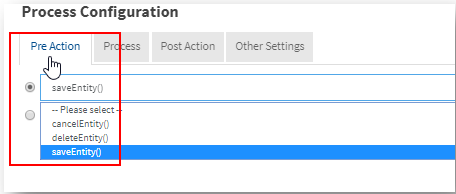
#### 1. Pre‑Action Tab
Defines actions executed **before** triggering the process.
Available built‑in options:
* `saveEntity()`
* `cancelEntity()`
* `deleteEntity()`
***
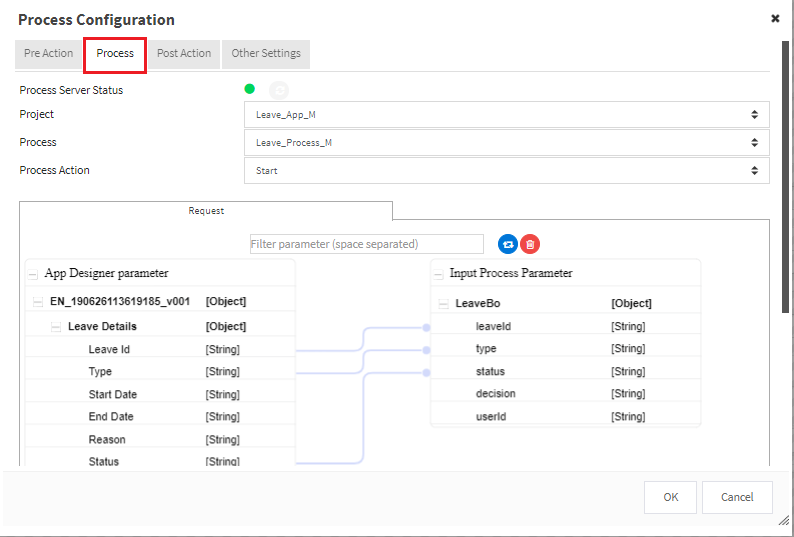
#### 2. Process Tab
Used to configure process execution.
| Item | Description |
| ------------------------- | ------------------------------------- |
| **Process Server Status** | Indicates process server connectivity |
| **Project** | Select Process Designer project |
| **Process** | Select process to execute |
| **Process Action** | Defines action for the process |
***
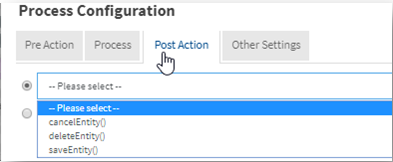
#### 3. Post‑Action Tab
Defines actions executed **after** process execution.
Available built‑in options:
* `saveEntity()`
* `cancelEntity()`
* `deleteEntity()`
***
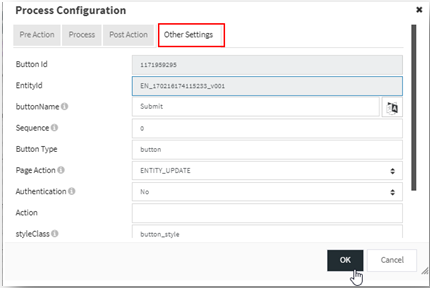
#### 4. Other Settings
Other settings follow the same structure as Entity Buttons (style, auth, visibility).
***
#### Process Button Properties (Summary)
| Property | Mandatory | Description |
| ------------------ | --------- | ---------------------------------- |
| **Button ID** | Yes | System‑generated unique identifier |
| **Entity\_ID** | Yes | Associated Entity |
| **buttonName** | Yes | Button label |
| **Sequence** | No | Display order |
| **Page Action** | Yes | ENTITY\_SEARCH / INSERT / UPDATE |
| **Authentication** | No | IAM authorization |
| **styleClass** | No | CSS class |
| **sourceTag** | No | HTML styling |
| **imgFlag** | No | Image‑based button |
***
### Summary
**Buttons** provide the action layer for Smart Forms in ONEWEB.
* **Entity Buttons** → Entity‑wide actions
* **Module Buttons** → Module‑level actions (1‑Many)
* **Process Buttons** → Workflow & microflow integration
Used together, buttons allow Smart Forms to move seamlessly from **data entry → data management → business process execution**, forming a complete enterprise solution.
---
# Agent Instructions: Querying This Documentation
If you need additional information that is not directly available in this page, you can query the documentation dynamically by asking a question.
Perform an HTTP GET request on the current page URL with the `ask` query parameter:
```
GET https://docs.onewebstack.com/designer-reference/app-designer/entity/create-new-entity/buttons.md?ask=
```
The question should be specific, self-contained, and written in natural language.
The response will contain a direct answer to the question and relevant excerpts and sources from the documentation.
Use this mechanism when the answer is not explicitly present in the current page, you need clarification or additional context, or you want to retrieve related documentation sections.