# Modules within an Entity
In ONEWEB, **Modules** are the structural building blocks within an **Entity** that define **where and how input fields are displayed** on a Smart Form.\
A module represents a logical subsection of a form and is responsible for layout, data binding, and interaction behavior.
Modules allow designers to organize fields into **clear, manageable sections**, improving both usability and maintainability of Smart Forms.
***
#### Role of Modules in Smart Forms
Module configuration provides the flexibility to:
* Design form layouts using **rows and columns**
* Control how user input is stored and retrieved
* Define how data is mapped to database tables
* Retrieve values dynamically using SQL queries
* Assemble fields visually using **drag‑and‑drop**
Each module requires configuration details such as:
* Database table name
* Primary or composite keys
* Sequences for record management
This makes modules the bridge between **UI layout**, **data persistence**, and **business logic**.
***
#### Fields within a Module
Fields are the **individual input elements** placed inside a module layout.\
Each field is designed to capture or display a specific type of data.
ONEWEB Smart Forms support the following field types:
| Field Type | Description |
| -------------- | ------------------------------------------------------------- |
| Text Box | Input for text and numeric values |
| Label | Static text display with rich text support |
| Hidden | Hidden field, commonly used for keys or internal values |
| Text Area | Input for long text (more than 100 characters) |
| Radio Button | Select one option from multiple choices |
| Checkbox | Select one or more options |
| List Box | Dropdown list with static values |
| Dynamic List | Dropdown populated dynamically from database tables |
| Popup | Popup window to search and select data from a database |
| Calendar | Date input field |
| Suggestion Box | Auto‑suggest field with keyword search |
| No Object | Displays computed or custom values not stored in the database |
| Multi‑Select | Select multiple values from a list |
| Upload | File attachment and upload field |
Fields can be arranged freely within a module’s layout to match form design requirements.
***
#### Types of Modules in App Designer
App Designer supports **three types of modules**, each suited for different data‑handling scenarios.
***
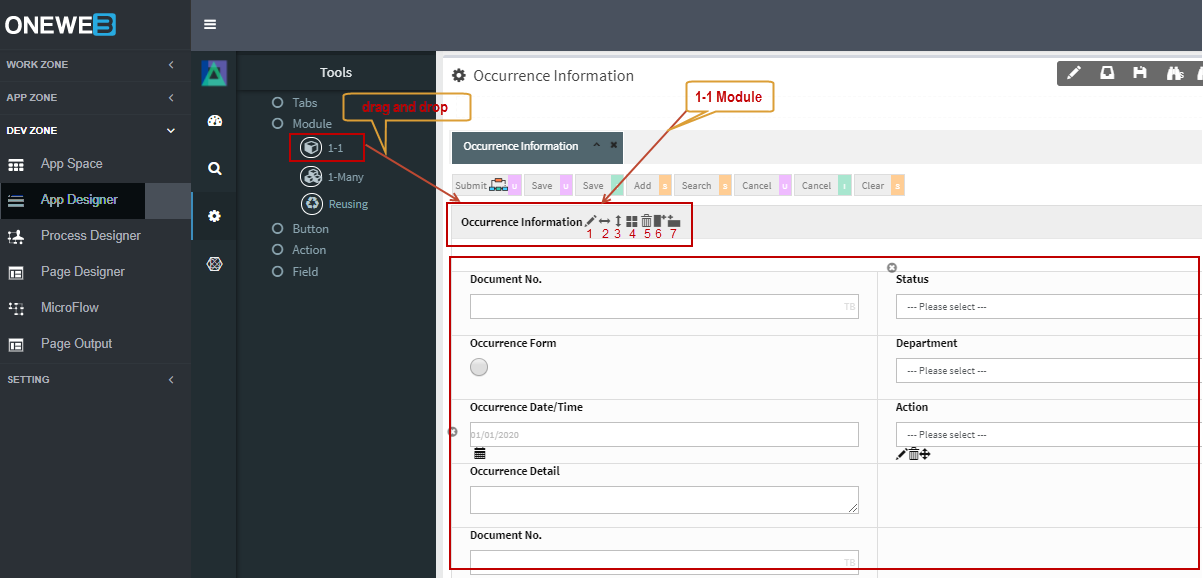
**One‑to‑One (1‑1) Module**
A **One‑to‑One module** manages data corresponding to **a single database record**.
Key characteristics:
* Ideal for master or header information
* Supports flexible row and column layouts
* Commonly used for forms such as customer details or request headers
Designers can easily add rows and columns to control layout structure.
Example: 1‑1 Module with a 5‑row × 2‑column layout\
\&#xNAN;*(Refer to App Designer Reference for detailed property settings)*
***
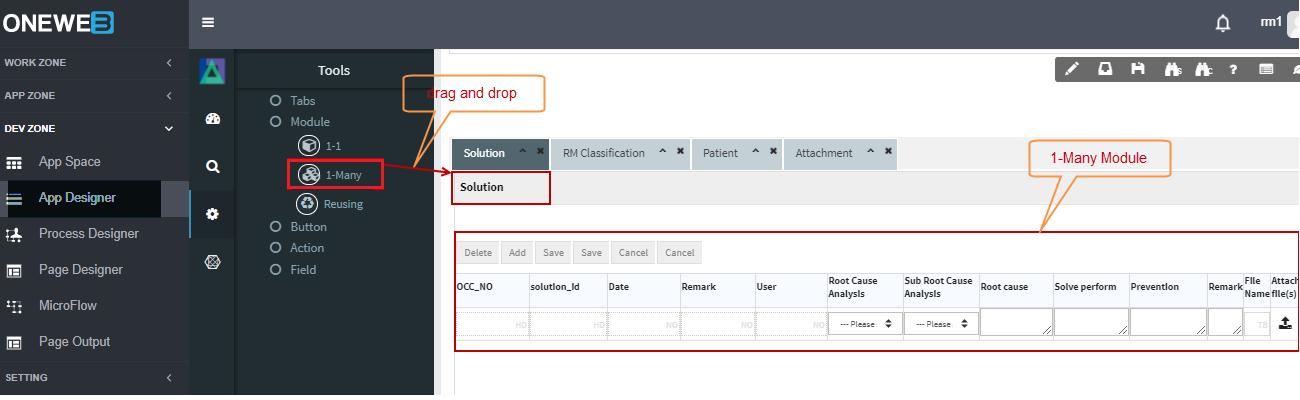
**One‑to‑Many (1‑Many) Module**
A **One‑to‑Many module** manages **multiple related records** and displays them in a tabular format.
Key characteristics:
* Supports **grid and card layouts**
* Suitable for handling lists, line items, or child records
* Can manage large datasets with multiple columns
This module type is commonly used for order items, attachments, or transaction histories.
***
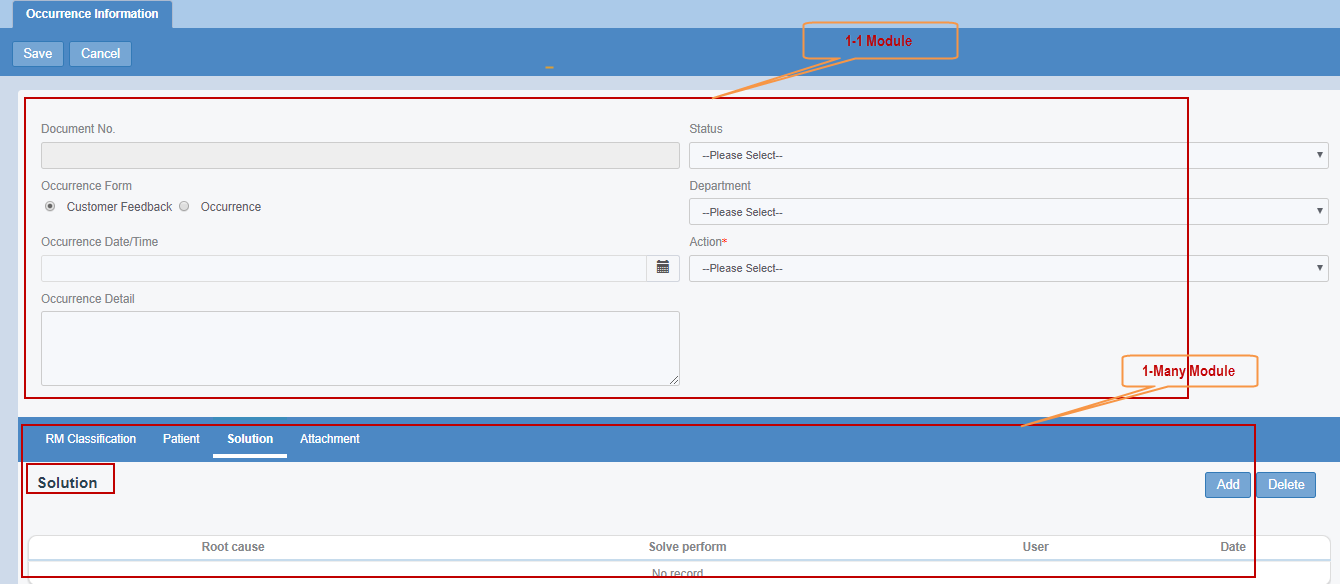
**Combined Module Usage**
Smart Forms often combine **1‑1 and 1‑Many modules** within the same screen.
Typical example:
* 1‑1 module for master information
* 1‑Many module for detail records
***
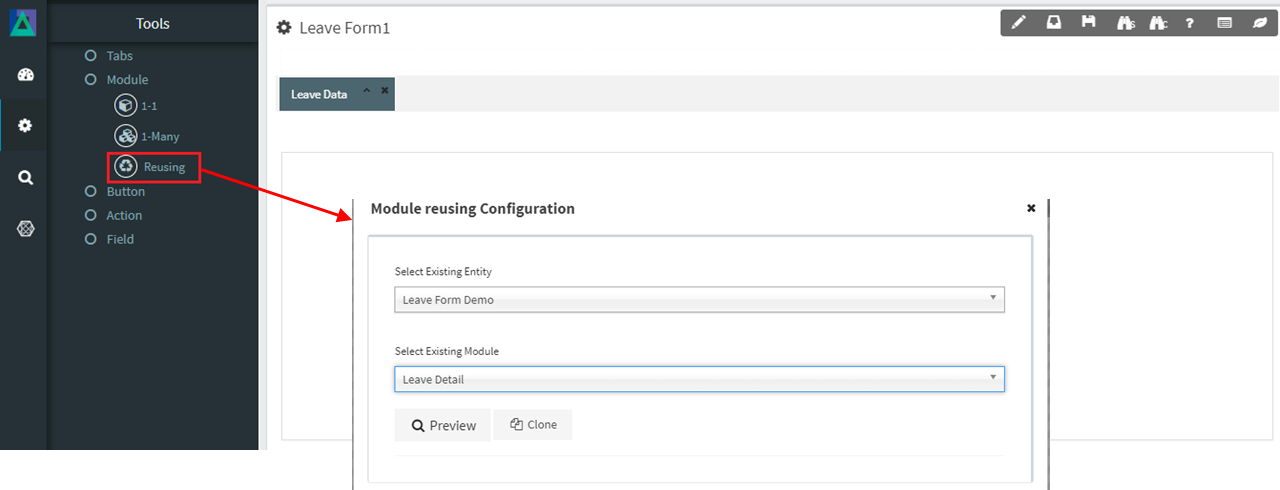
**Reuse Module**
The **Reuse Module** feature allows designers to **reuse existing module configurations**.
Key points:
* Existing modules can be cloned into a new tab
* Field layout and database mappings are copied
* Action configurations are **not copied** and must be reconfigured separately
This feature helps maintain consistency and significantly reduces development time.
***
#### Design Perspective
Within **UI / Page Designer best practices**:
* Use **1‑1 modules** for master or header data
* Use **1‑Many modules** for lists and repeating records
* Reuse modules to improve consistency and maintainability
* Keep module responsibilities clear and focused
Well‑designed modules lead to cleaner Smart Forms, better usability, and easier long‑term maintenance.
---
# Agent Instructions: Querying This Documentation
If you need additional information that is not directly available in this page, you can query the documentation dynamically by asking a question.
Perform an HTTP GET request on the current page URL with the `ask` query parameter:
```
GET https://docs.onewebstack.com/building-apps/ui-page-designer/ux-ui-components/smart-forms/modules-within-an-entity.md?ask=
```
The question should be specific, self-contained, and written in natural language.
The response will contain a direct answer to the question and relevant excerpts and sources from the documentation.
Use this mechanism when the answer is not explicitly present in the current page, you need clarification or additional context, or you want to retrieve related documentation sections.