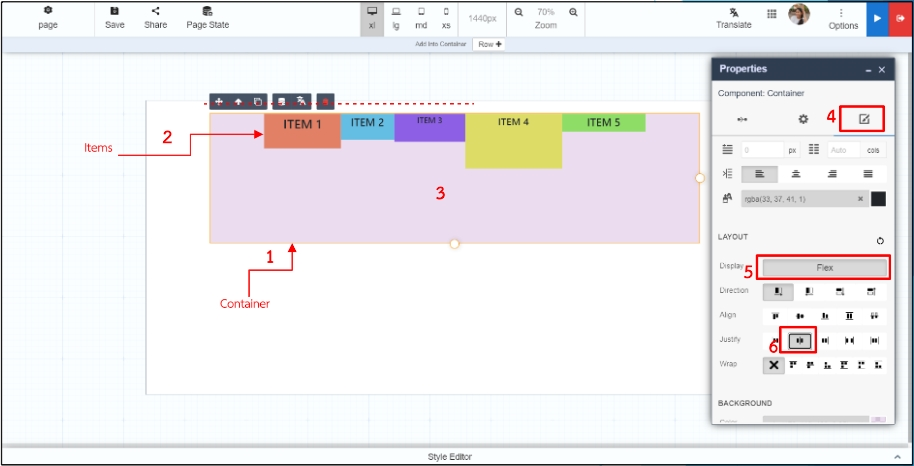
# Display Flex

**Display Flex** allows users to create **flexible, responsive layouts** by controlling the flow, alignment, and distribution of elements inside a container.\
This feature is based on the **CSS Flexbox model** and is fully integrated into **ONEWEB Page Designer** as a visual configuration—no CSS coding required.

With Display Flex, users can:

* Control layout direction (row / column)
* Reverse item order dynamically
* Align items along main and cross axes
* Distribute space evenly
* Collapse or expand layouts while preserving structure

***

### Enable Display Flex (Basic Steps)

These steps apply to **all Flex configurations**:

1. Drag and drop a **Container**
2. Drag and drop **child items** into the container
3. Click the **Container**
4. Open the **Style** tab
5. Enable **Display Flex** under **Layout**

> Once enabled, default values are applied:
>
> * **Direction:** Row
> * **Wrap:** Don’t wrap

***

### Default Layout (No Display Flex)

If **Display Flex is not enabled**, components follow the normal document flow.

<figure><img src="https://2015371994-files.gitbook.io/~/files/v0/b/gitbook-x-prod.appspot.com/o/spaces%2FMpDjHWFRUtZ5nJcSfVXd%2Fuploads%2FrnzpvQp037hguMc9IjhQ%2Fimage.png?alt=media&#x26;token=43595377-c886-45cf-9cf6-1055702cb003" alt=""><figcaption></figcaption></figure>

***

### Flex Direction

#### ▶ Direction: Row (Default)

* **LTR:** Left → Right
* **RTL:** Right → Left

<figure><img src="https://2015371994-files.gitbook.io/~/files/v0/b/gitbook-x-prod.appspot.com/o/spaces%2FMpDjHWFRUtZ5nJcSfVXd%2Fuploads%2FPawXTSWuEo8ZI2ld4fO1%2Fimage.png?alt=media&#x26;token=eee4ac34-6421-4004-85df-4ef03fcca667" alt=""><figcaption></figcaption></figure>

***

#### ◀ Direction: Row‑Reverse

* **LTR:** Right → Left
* **RTL:** Left → Right

<figure><img src="https://2015371994-files.gitbook.io/~/files/v0/b/gitbook-x-prod.appspot.com/o/spaces%2FMpDjHWFRUtZ5nJcSfVXd%2Fuploads%2FiWPMV4pU8iuu76ppMSWk%2Fimage.png?alt=media&#x26;token=6e1bcb9f-ef4d-47a2-a897-d79f771bf32a" alt=""><figcaption></figcaption></figure>

***

#### ▼ Direction: Column

* Top → Bottom

<figure><img src="https://2015371994-files.gitbook.io/~/files/v0/b/gitbook-x-prod.appspot.com/o/spaces%2FMpDjHWFRUtZ5nJcSfVXd%2Fuploads%2FvjkHPUGt8NFHvedcelmQ%2Fimage.png?alt=media&#x26;token=9bd1c7ee-d84c-442c-9774-826ac8fac132" alt=""><figcaption></figcaption></figure>

***

#### ▲ Direction: Column‑Reverse

* Bottom → Top

<figure><img src="https://2015371994-files.gitbook.io/~/files/v0/b/gitbook-x-prod.appspot.com/o/spaces%2FMpDjHWFRUtZ5nJcSfVXd%2Fuploads%2FevRRTWj73hw6POBqlIsu%2Fimage.png?alt=media&#x26;token=a87d2bba-bfb2-41f6-b412-7e0698b9cbb0" alt=""><figcaption></figcaption></figure>

***

### Align Items (Cross Axis)

#### Align: Flex‑Start

Items start at the beginning of the cross axis.

<figure><img src="https://2015371994-files.gitbook.io/~/files/v0/b/gitbook-x-prod.appspot.com/o/spaces%2FMpDjHWFRUtZ5nJcSfVXd%2Fuploads%2FSKwvpTFdXddGGlrbUBuv%2Fimage.png?alt=media&#x26;token=ccccffa7-d03e-496a-98cd-8364b634440d" alt=""><figcaption></figcaption></figure>

***

#### Align: Center

Items are centered on the cross axis.

<figure><img src="https://2015371994-files.gitbook.io/~/files/v0/b/gitbook-x-prod.appspot.com/o/spaces%2FMpDjHWFRUtZ5nJcSfVXd%2Fuploads%2FWaTT752A7zNmSCSIsyhK%2Fimage.png?alt=media&#x26;token=cab7e11a-4038-407b-9dce-d1a900489b63" alt=""><figcaption></figcaption></figure>

***

#### Align: Flex‑End

Items align to the end of the cross axis.

<figure><img src="https://2015371994-files.gitbook.io/~/files/v0/b/gitbook-x-prod.appspot.com/o/spaces%2FMpDjHWFRUtZ5nJcSfVXd%2Fuploads%2FAkWc21LFkD1YFIVGbEeL%2Fimage.png?alt=media&#x26;token=d85b9c83-75a8-4ce7-bed7-c6fe36d397a2" alt=""><figcaption></figcaption></figure>

***

#### Align: Stretch

Items stretch to fill the container\
(*respecting min/max width constraints*)

<figure><img src="https://2015371994-files.gitbook.io/~/files/v0/b/gitbook-x-prod.appspot.com/o/spaces%2FMpDjHWFRUtZ5nJcSfVXd%2Fuploads%2FCZiX4EMaHeGHEMP6bk3l%2Fimage.png?alt=media&#x26;token=58f3553f-21be-4421-b223-e7c97cc91350" alt=""><figcaption></figcaption></figure>

***

### Justify Content (Main Axis)

#### Justify: Flex‑Start

Items pack toward the start.

<figure><img src="https://2015371994-files.gitbook.io/~/files/v0/b/gitbook-x-prod.appspot.com/o/spaces%2FMpDjHWFRUtZ5nJcSfVXd%2Fuploads%2F6jVapMEfTO4aarW8Fjv9%2Fimage.png?alt=media&#x26;token=c3f569a7-40a5-448f-b45c-7a1e9a3e904c" alt=""><figcaption></figcaption></figure>

***

#### Justify: Center

Items centered on the line.

<figure><img src="https://2015371994-files.gitbook.io/~/files/v0/b/gitbook-x-prod.appspot.com/o/spaces%2FMpDjHWFRUtZ5nJcSfVXd%2Fuploads%2FplA3wEVqGxwo1iF7azMW%2Fimage.png?alt=media&#x26;token=33b39880-06cb-4ecb-8bd5-4d6f061fa1fb" alt=""><figcaption></figcaption></figure>

***

#### Justify: Flex‑End

Items pack toward the end.

<figure><img src="https://2015371994-files.gitbook.io/~/files/v0/b/gitbook-x-prod.appspot.com/o/spaces%2FMpDjHWFRUtZ5nJcSfVXd%2Fuploads%2F7eX4E1vZLdb2nu6JcBaS%2Fimage.png?alt=media&#x26;token=3859be77-7239-4159-9d08-0e9f856cc9f5" alt=""><figcaption></figcaption></figure>

***

#### Justify: Space‑Between

Even distribution; first and last touch container edges.

<figure><img src="https://2015371994-files.gitbook.io/~/files/v0/b/gitbook-x-prod.appspot.com/o/spaces%2FMpDjHWFRUtZ5nJcSfVXd%2Fuploads%2FTQSnjojX3JLgWgTdAsgi%2Fimage.png?alt=media&#x26;token=566c54d7-df57-4740-99c2-0e7efbed6ff4" alt=""><figcaption></figcaption></figure>

***

#### Justify: Space‑Around

Equal space around items (visual spacing differs at edges).

<figure><img src="https://2015371994-files.gitbook.io/~/files/v0/b/gitbook-x-prod.appspot.com/o/spaces%2FMpDjHWFRUtZ5nJcSfVXd%2Fuploads%2FaRTLut5rv8XsGc4zSURl%2Fimage.png?alt=media&#x26;token=990af30d-5a38-4b0a-bf60-198ad5760b11" alt=""><figcaption></figcaption></figure>

***

### Wrap Behavior

#### Wrap: Don’t Wrap (Default)

All items stay on a single line.

<figure><img src="https://2015371994-files.gitbook.io/~/files/v0/b/gitbook-x-prod.appspot.com/o/spaces%2FMpDjHWFRUtZ5nJcSfVXd%2Fuploads%2Fu9x1BvoB7InvMxcklQra%2Fimage.png?alt=media&#x26;token=b714d04d-2127-4aa3-9ead-3c0684c45f0b" alt=""><figcaption></figcaption></figure>

***

#### Wrap Alignment Options

* **Wrap Flex‑Start**
* **Wrap Center**
* **Wrap Flex‑End**
* **Wrap Stretch**
* **Wrap Space‑Between**
* **Wrap Space‑Around**


---

# Agent Instructions: Querying This Documentation

If you need additional information that is not directly available in this page, you can query the documentation dynamically by asking a question.

Perform an HTTP GET request on the current page URL with the `ask` query parameter:

```
GET https://docs.onewebstack.com/building-apps/ui-page-designer/ux-ui-components/pages/page-features/display-flex.md?ask=<question>
```

The question should be specific, self-contained, and written in natural language.
The response will contain a direct answer to the question and relevant excerpts and sources from the documentation.

Use this mechanism when the answer is not explicitly present in the current page, you need clarification or additional context, or you want to retrieve related documentation sections.