# SSL Support
ONEWEB 4.0 supports **SSL/TLS (HTTPS)** to ensure secure communication between clients and the application server.\
By enabling SSL, all data transmitted between client and server is **encrypted**, protecting it from interception, tampering, and man‑in‑the‑middle attacks.
SSL/TLS is a fundamental requirement for:
* Secure authentication
* Token‑based API access
* Compliance with security standards and regulations
***
### Purpose of SSL/TLS in ONEWEB
Enabling SSL/TLS helps to:
* Encrypt data in transit
* Protect credentials, tokens, and sensitive information
* Prevent unauthorized network access
* Meet compliance and corporate security requirements
* Enable secure access over HTTPS
***
### Generate SSL Key and Certificate
To enable SSL, you must generate a **key pair and certificate** for the application server.
In general, there are **two supported approaches**:
#### Option 1: Java Secure Socket Extension (JSSE)
* Uses Java keystore (`.keystore`)
* Commonly used with WildFly / JBoss
* Fully Java‑based
#### Option 2: Native OpenSSL Implementation
* Uses OpenSSL libraries
* Suitable for environments requiring native crypto handling
In both cases, you must prepare a **keystore** containing:
* Private key
* Certificate (self‑signed or CA‑signed)
***
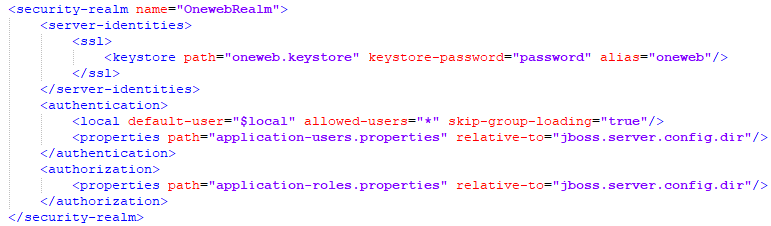
### Configure SSL in WildFly (ONEWEB Server)
The following steps assume that the keystore file generated in the previous step is:
```
oneweb.keystore
```
***
#### Step 1: Copy Keystore File
Copy the keystore file to the WildFly configuration directory:
```
$JBOSS_HOME/standalone/configuration/
```
***
#### Step 2: Edit `standalone.xml`
Open the file:
```
$JBOSS_HOME/standalone/configuration/standalone.xml
```
***
#### Step 3: Configure Undertow HTTPS Listener
Within the `` section, locate the **Undertow subsystem**.\
This subsystem contains two main components:
* **Server**
* **Servlet container**
Under the **Server** section, add an **`https-listener`** definition to enable HTTPS support.
This listener references the SSL key and enables secure HTTPS connections.
***
#### Step 4: Update HTTPS Port Binding
Under the **Socket Binding Group** section:
* Change the default HTTPS port from **8443** to **443** (recommended for production)
Port **443** is the standard port for HTTPS traffic and improves compatibility with external clients and firewalls.
***
### Restart Server
After completing SSL configuration:
1. Save all configuration changes
2. Restart the WildFly server
Once restarted, ONEWEB will be accessible securely via:
```
https:///
```
***
### Security & Compliance Considerations
When enabling SSL/TLS:
* Use **CA‑signed certificates** in production environments
* Protect keystore files and private keys
* Enforce HTTPS for all authentication and API endpoints
* Disable weak cipher suites and protocols if configurable
* Redirect HTTP traffic to HTTPS
SSL/TLS is mandatory for:
* Token‑based authentication (JWT)
* Secure REST API access
* Compliance with modern security standards
***
### Summary
SSL/TLS support in ONEWEB ensures **secure, encrypted communication** for applications and APIs.
Key points:
* ONEWEB 4.0 supports SSL via WildFly configuration
* Keystore‑based certificates are required
* HTTPS listeners are configured in the Undertow subsystem
* Port 443 is recommended for production
* SSL is essential for security, authentication, and compliance
Enabling SSL is a critical step toward deploying **secure and enterprise‑ready ONEWEB applications**.
---
# Agent Instructions: Querying This Documentation
If you need additional information that is not directly available in this page, you can query the documentation dynamically by asking a question.
Perform an HTTP GET request on the current page URL with the `ask` query parameter:
```
GET https://docs.onewebstack.com/building-apps/security-and-compliance/ssl-support.md?ask=
```
The question should be specific, self-contained, and written in natural language.
The response will contain a direct answer to the question and relevant excerpts and sources from the documentation.
Use this mechanism when the answer is not explicitly present in the current page, you need clarification or additional context, or you want to retrieve related documentation sections.