# Validation Node
The **Validation Node** is a built‑in **Custom Extension** provided by ONEWEB that allows developers to **validate data within Business Objects (BO)** during the execution of Microflows or Process Flows.
This node helps ensure data quality and correctness before data is processed further, persisted, or sent to external systems.
***
### Purpose of Validation Node
The Validation Node is designed to:
* Validate one or more Business Objects against defined rules
* Enforce data quality centrally within integration flows
* Prevent invalid data from propagating through the system
* Produce structured validation error messages
* Reduce duplicated validation logic across Microflows
Typical use cases include:
* Validating user input before database operations
* Ensuring required fields exist before calling external services
* Validating batch or imported data (for example from Excel)
***
### Install Validation Node Extension
Before using the Validation Node, the extension must be **installed and enabled** in the application.
To install the extension:
* Follow the steps described in **Section 6.4.16 – Custom Extensions**
* Install and enable the **Validation Node extension** for the application
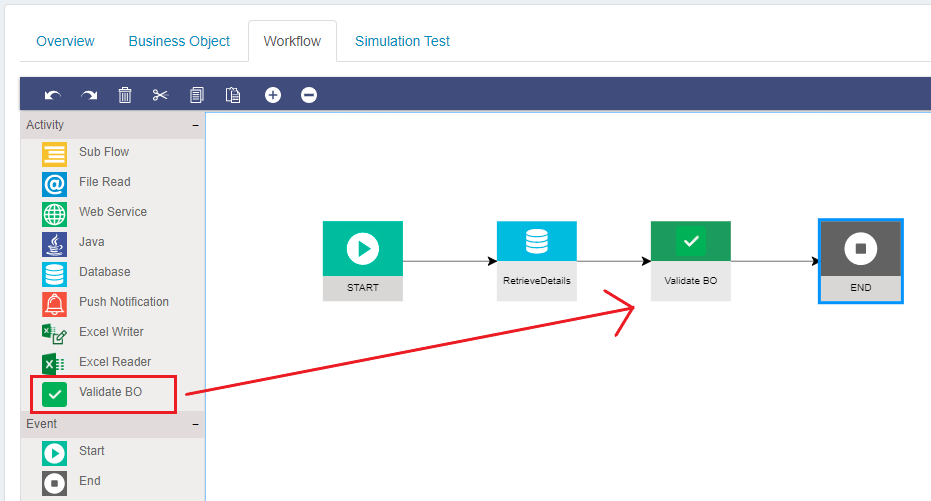
Once installed, the Validation Node becomes available in the **diagram palette** and can be used like any other activity node.
***
### Configuring Validation Rules
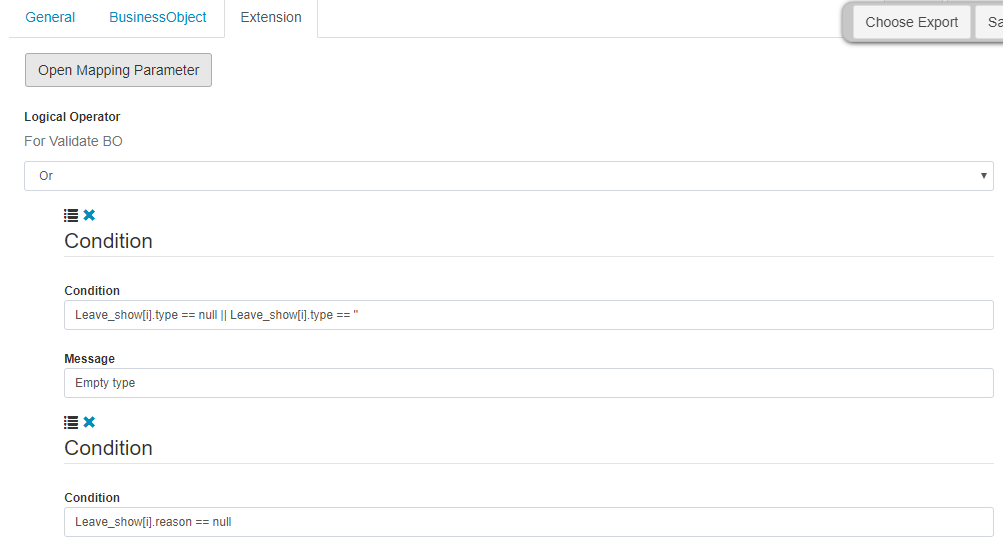
Validation behavior is configured through the **Extension Properties** of the Validation Node.
#### Logical Operators
The Validation Node supports two logical operators:
* **AND**\
All validation conditions must be satisfied for validation to pass
* **OR**\
Validation passes if at least one condition is satisfied
The chosen operator defines how multiple validation rules are evaluated.
Validation results (including error messages) are produced as output and can be used by downstream logic.
***
### Input Mapping (Business Objects)
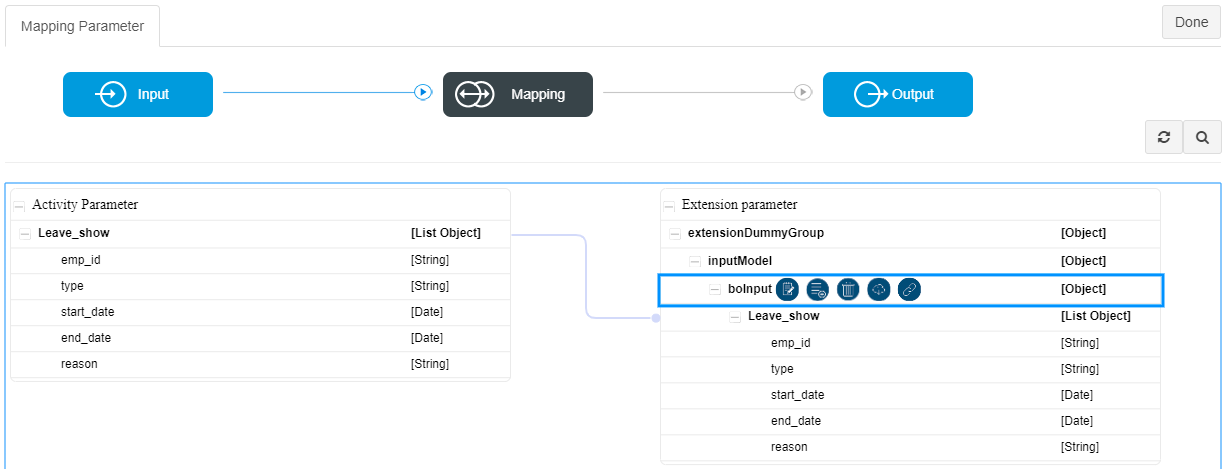
All Business Objects that require validation must be mapped as **input** to the Validation Node.
Steps:
1. Open **Mapping Parameter**
2. Add all Business Objects to be validated under **BO Input**
3. Use the **lookup** option to select existing Business Objects
This allows the Validation Node to evaluate multiple Business Objects within a single execution.
***
### Output Mapping (Validation Messages)
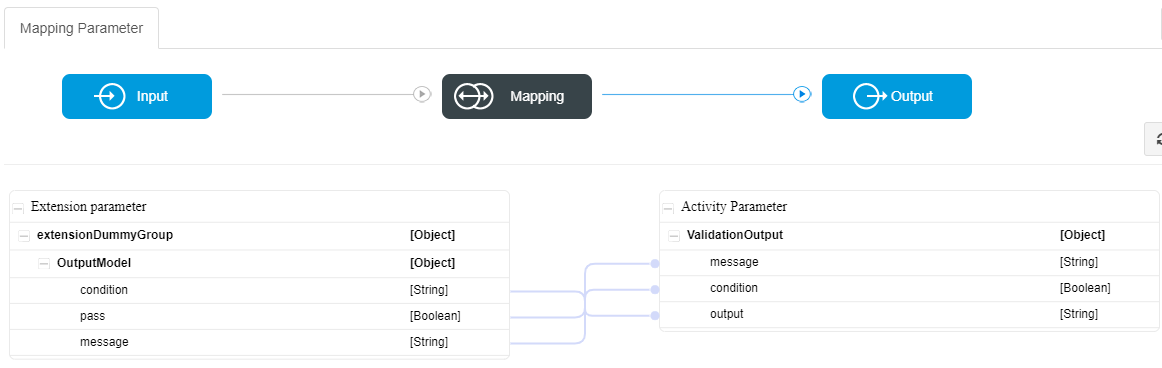
The Validation Node generates structured **validation output messages**, which can be:
* Mapped to output Business Objects
* Evaluated using a **Gateway Node**
* Returned to UI components (Smart Form / Page)
* Logged or persisted for audit purposes
Example output mapping is shown below:
***
### Using Validation Results in Flow Logic
Common integration patterns include:
* Branching flow execution using a **Gateway Node**
* Stopping execution when validation fails
* Returning validation messages to UX/UI
* Combining validation with **Error** or **Timer** handling
The Validation Node integrates cleanly with both **Microflow** and **Process Flow** execution models.
***
### Best Practices
* Perform validation **early** in the flow
* Keep validation rules simple and focused
* Use Validation Node instead of duplicating logic in multiple nodes
* Always handle and map validation output messages
* Separate validation from core business processing
***
### Summary
The **Validation Node** is a built‑in Custom Extension that enables **structured and reusable data validation** in ONEWEB.
With the Validation Node, developers can:
* Validate one or more Business Objects
* Apply AND / OR logical rules
* Produce consistent validation feedback
* Control flow behavior based on validation results
This node is essential for building **robust, reliable, and enterprise‑grade integration workflows** using ONEWEB Microflow.
---
# Agent Instructions: Querying This Documentation
If you need additional information that is not directly available in this page, you can query the documentation dynamically by asking a question.
Perform an HTTP GET request on the current page URL with the `ask` query parameter:
```
GET https://docs.onewebstack.com/building-apps/integrations/develop-integration-with-oneweb-microflow/validation-node.md?ask=
```
The question should be specific, self-contained, and written in natural language.
The response will contain a direct answer to the question and relevant excerpts and sources from the documentation.
Use this mechanism when the answer is not explicitly present in the current page, you need clarification or additional context, or you want to retrieve related documentation sections.