# Excel Writer
The **Excel Writer** is a built‑in **Custom Extension** provided by ONEWEB that allows Microflows and Process Flows to **write data to Excel files**.
Excel Writer complements the Excel Reader extension by enabling applications not only to read Excel data but also to **generate or export data into Excel format**, making it suitable for reporting, data exchange, and batch output scenarios.
***
### Purpose of Excel Writer
The Excel Writer extension is designed to:
* Write structured data to Microsoft Excel files
* Generate Excel files as outputs of Microflows or Processes
* Support file‑based data export and reporting use cases
* Integrate backend systems with Excel‑based consumers
Typical use cases include:
* Exporting transaction or report data to Excel
* Generating Excel files for downstream systems
* Producing downloadable Excel reports
* Writing processed batch results into spreadsheets
***
### Install Excel Writer Extension
Before using Excel Writer, the extension must be **installed and enabled** for the application.
To install the extension:
* Follow the steps described in **Section 6.4.16 – Custom Extensions**
* Install and enable the **Excel Writer extension** in the application
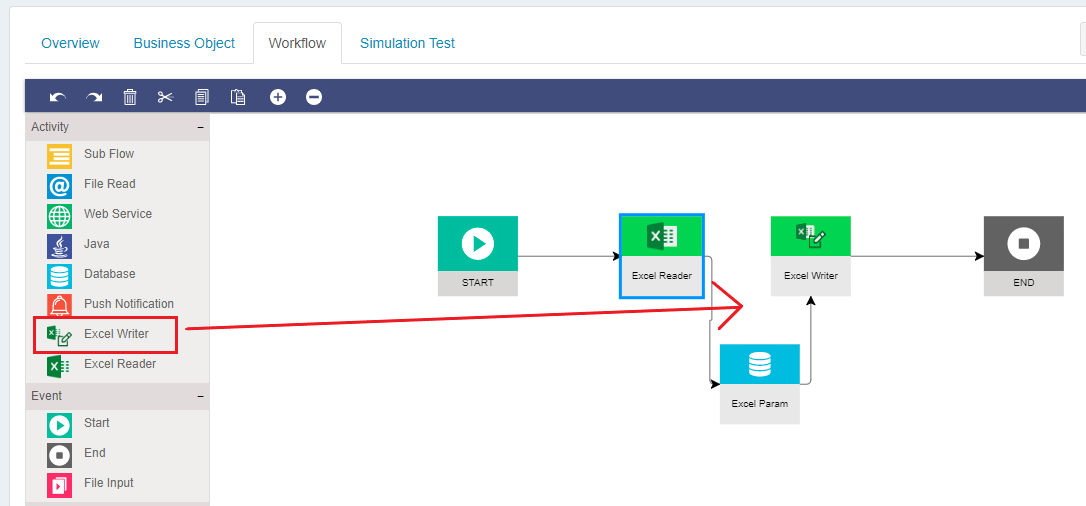
Once installed, the Excel Writer node appears in the **diagram palette** and can be used like any standard activity node.
***
### Configuring Excel Writer
After placing the Excel Writer node on the canvas, users can configure how and where data is written.
#### File Destination Configuration
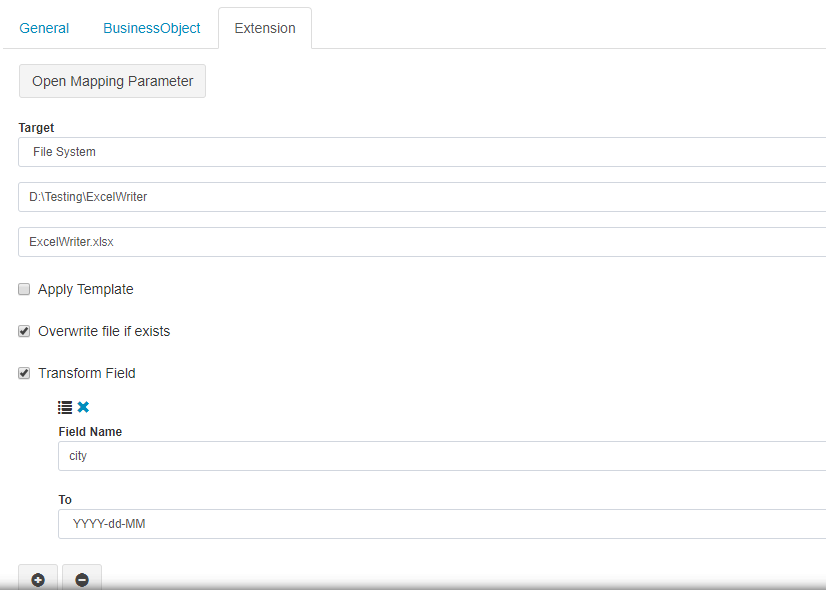
Excel Writer supports writing Excel files to multiple destinations:
* **File System**
* **Network locations**
* **FTP**
* **SFTP**
* **FTPS**
Users can:
* Enter directory and file details directly
* Or retrieve destination details dynamically from a **Business Object** (similar to Excel Reader)
Excel Writer also provides options to **transform data into predefined formats** before writing.
***
### Writing Data to Excel Sheets
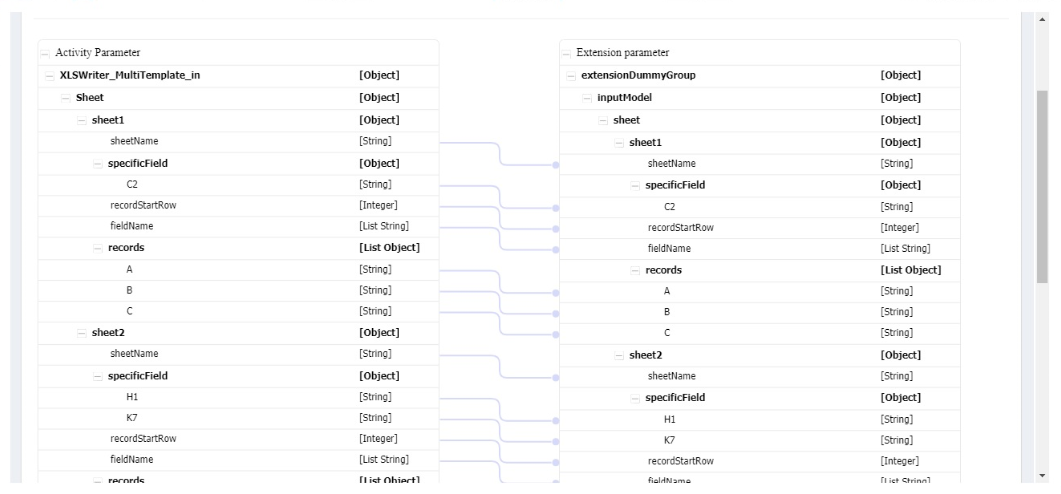
Excel Writer supports writing data:
* To **specific columns**
* Or as **entire rows (records)**
These options are configured per worksheet, giving fine‑grained control over how data appears in Excel.
#### Writing Options
* **Specific Field**
* Write values to specific columns
* **Records**
* Write complete rows as records
***
### Writing Multiple Sheets
Excel Writer supports writing **multiple worksheets** within a single Excel file.
* Different data sets can be mapped to different sheets
* Users can control sheet names and data mappings
* All sheets are written as part of a single execution
This makes Excel Writer suitable for complex reporting and batch export scenarios.
***
### Data Mapping
Excel Writer uses **Business Objects** to define:
* Input data to be written
* Field‑to‑column mappings
* Record‑level structures
Mapping is done in the same visual manner as other Microflow activity nodes, ensuring consistency across integration logic.
***
### Best Practices
* Use Excel Writer for **output and reporting**, not transactional updates
* Validate directory and permissions before writing files
* Avoid overwriting critical files unintentionally
* Use environment variables for destination paths when possible
* Combine Excel Writer with **Database**, **Excel Reader**, or **Web Service** nodes for end‑to‑end flows
***
### Summary
The **Excel Writer extension** enables ONEWEB applications to generate and export data into Excel files as part of Microflows or Process Flows.
With Excel Writer, developers can:
* Write structured data to Excel spreadsheets
* Support multi‑sheet Excel generation
* Output data to file systems or remote locations
* Build Excel‑based reporting and integration workflows
Excel Writer is a key component for implementing **file‑based output, reporting, and batch export integrations** in ONEWEB.
---
# Agent Instructions: Querying This Documentation
If you need additional information that is not directly available in this page, you can query the documentation dynamically by asking a question.
Perform an HTTP GET request on the current page URL with the `ask` query parameter:
```
GET https://docs.onewebstack.com/building-apps/integrations/develop-integration-with-oneweb-microflow/excel-writer.md?ask=
```
The question should be specific, self-contained, and written in natural language.
The response will contain a direct answer to the question and relevant excerpts and sources from the documentation.
Use this mechanism when the answer is not explicitly present in the current page, you need clarification or additional context, or you want to retrieve related documentation sections.