# Data Mapping
**Data Mapping** is a fundamental aspect of system integration. It defines how **input and output parameters** are transferred between components so that data flows correctly across the application.
In ONEWEB, data mapping is handled through a **visual, drag‑and‑drop interface**, allowing developers to connect parameters between UI components, Microflows, and integration nodes without writing mapping code.
***
### Purpose of Data Mapping in ONEWEB
Data Mapping enables applications to:
* Transfer data between different components
* Maintain clear contracts between UI and backend logic
* Reduce integration errors caused by mismatched parameters
* Visualize data flow across integration layers
Proper data mapping ensures consistency, readability, and maintainability of integrations.
***
### Data Mapping from Smart Form to Microflow
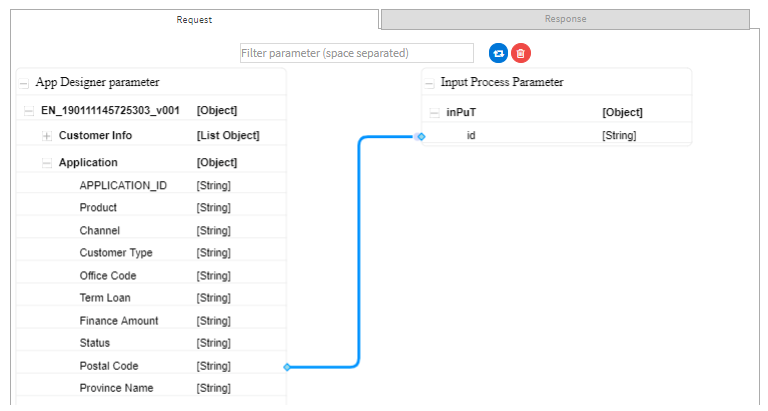
ONEWEB provides an intuitive **drag‑and‑drop mapping screen** that allows users to map data between **Smart Forms (App Designer)** and **Microflows**.
#### Input Parameter Mapping
To pass data from a Smart Form to a Microflow:
1. Select a Smart Form field in **App Designer**
2. Drag the field to the corresponding **Microflow input parameter**
3. The mapped value is automatically passed when the Microflow is invoked
This mechanism is commonly used when invoking a Microflow from UI events such as button clicks or field changes.
***
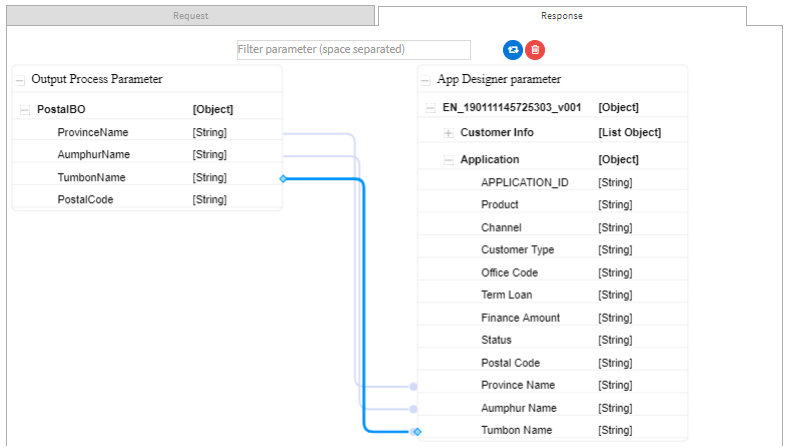
#### Output (Response) Mapping
When a Microflow returns data:
1. Open the **Response Mapping** tab
2. Drag the output parameters returned from the Microflow
3. Map them to the appropriate Smart Form fields
This allows the UI to be updated dynamically based on Microflow execution results.
**Typical use cases**
* Populate form fields using backend data
* Show calculated or validated results
* Display data retrieved from external systems
***
### Data Mapping within Microflow Nodes
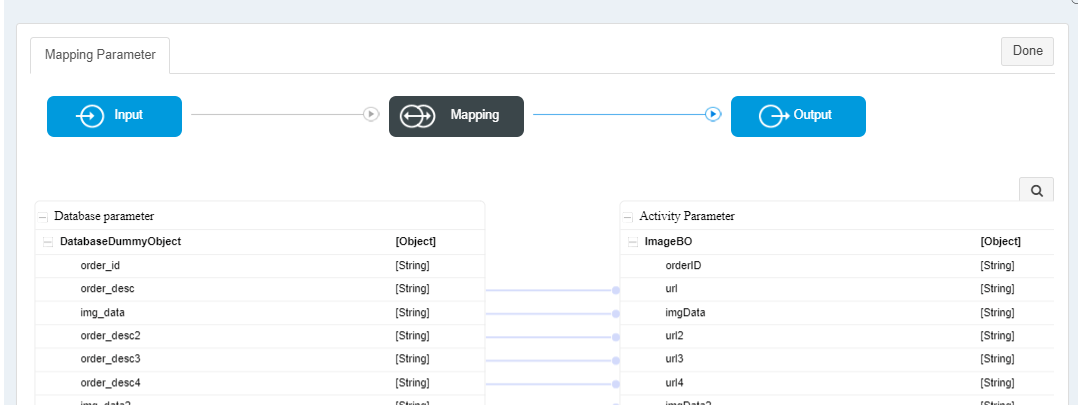
ONEWEB also provides a dedicated **Parameter Mapping screen** inside Microflow Designer to map data between:
* Microflow input parameters
* Activity or node‑level inputs
* Outputs from one node to inputs of another
Each integration node (Database, Web Service, File Read, etc.) includes a mapping interface that allows data to be passed into and out of the node.
This visual mapping ensures that:
* Data transformations are explicit
* Node interactions are easy to understand
* Integration logic remains maintainable
***
### Best Practices for Data Mapping
To ensure reliable and maintainable integrations:
* Clearly define input and output parameters before mapping
* Keep Microflow contracts stable and well‑named
* Avoid unnecessary parameter duplication
* Reuse business objects consistently across integrations
* Validate response mapping to avoid UI inconsistencies
Well‑designed data mapping reduces runtime errors and improves overall integration quality.
***
### Summary
**Data Mapping** in ONEWEB provides a visual and intuitive way to transfer data between UI components, Microflows, and integration nodes.
With ONEWEB’s mapping features, users can:
* Map Smart Form fields to Microflow parameters
* Map Microflow responses back to UI fields
* Configure data flow between nodes inside a Microflow
* Maintain clear, readable integration logic
Effective data mapping is a key enabler for building **robust, scalable, and maintainable integrations** in ONEWEB.
---
# Agent Instructions: Querying This Documentation
If you need additional information that is not directly available in this page, you can query the documentation dynamically by asking a question.
Perform an HTTP GET request on the current page URL with the `ask` query parameter:
```
GET https://docs.onewebstack.com/building-apps/integrations/develop-integration-with-oneweb-microflow/data-mapping.md?ask=
```
The question should be specific, self-contained, and written in natural language.
The response will contain a direct answer to the question and relevant excerpts and sources from the documentation.
Use this mechanism when the answer is not explicitly present in the current page, you need clarification or additional context, or you want to retrieve related documentation sections.