# Access from Process / Microflow
In **Data & Content Management**, **Access from Process / Microflow** describes how applications read, write, and manage **files, documents, and images** through the **process layer**, rather than directly from the UI.
ONEWEB provides dedicated activities and extensions within **Process Designer** and **Microflow** to handle different types of file‑based content in a controlled and extensible manner.
***
### Supported File Types via File Read Node
For structured file formats such as:
* **Excel**
* **XML**
* **Delimited files**
* **Fixed‑width files**
ONEWEB provides a **File Read Node**, available in both **Process Designer** and **Microflow**.
The File Read Node allows processes to:
* Read file contents
* Parse structured data
* Pass extracted values into Business Objects or further processing steps
This node is suitable for data‑centric file formats that require structured parsing.
***
### Handling Other File Formats
The **File Read Node does not support**:
* Images
* Binary files
* Documents in unsupported formats (for example, PDF, DOC, custom binary files)
When an application needs to **read or write files in other formats**, ONEWEB provides an alternative approach using **Java Tasks**.
***
### Access Files Using Java Task
A **Java Task** allows developers to execute custom Java code within a Process or Microflow, enabling full control over file handling.
This approach is used when:
* Custom file formats must be supported
* Binary file processing is required
* Files need to be written to specific server paths
* Advanced encoding or transformation logic is needed
***
### Read Files Using Java Task
To read a file using Java Task:
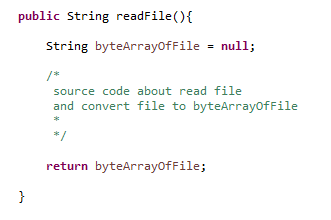
1. Write Java code to read the file from the file system
2. Convert the file content from `byte[]` to `String`
3. Define the function return type as `String`
4. Export the Java code as a **JAR file**
5. Upload the JAR file to **Process Designer** or **Microflow**
6. Map the return value to a Process or Microflow parameter
This allows file content to be consumed and processed within the flow.
**Sample Java implementation (illustrative):**
**Parameter Mapping:**
***
### Write Files Using Java Task
To write a file using Java Task:
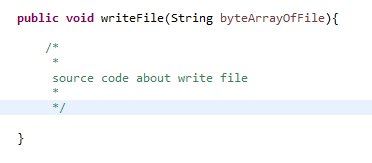
1. Define a function argument as `String`
2. Convert the input string to `byte[]`
3. Write the byte array to the desired file path on the server
4. Package the code as a JAR file
5. Upload and configure it in the Process or Microflow
6. Map input parameters accordingly
This approach is typically used for:
* Writing reports
* Exporting generated files
* Persisting transformed content to the file system
**Sample Java implementation (illustrative):**
**Parameter Mapping:**
***
### Image Files Handling (Base64)
Images can be handled efficiently by encoding them as **Base64 strings**.
Once encoded:
* Images are treated the same way as plain strings
* They can be stored in the database
* They can be passed through Processes or Microflows
* They can be decoded and rendered on the UI
To read an image as a Base64 encoded string, use a Java Task to:
* Read the image file as `byte[]`
* Convert it to a Base64 string
* Return the string to the process
**Sample implementation (illustrative):**
**Parameter Mapping:**
***
### Summary
**Access from Process / Microflow** provides a powerful and flexible mechanism for managing **files, documents, and images** within ONEWEB applications.
Key capabilities include:
* Built‑in File Read Node for structured data files
* Java Task support for custom file formats and binary data
* Controlled read/write operations through process logic
* Base64‑based image handling for seamless integration
* Alignment with Data & Content Management governance
By handling file access at the **process layer**, applications maintain consistency, control, and scalability across both data and content workflows.
---
# Agent Instructions: Querying This Documentation
If you need additional information that is not directly available in this page, you can query the documentation dynamically by asking a question.
Perform an HTTP GET request on the current page URL with the `ask` query parameter:
```
GET https://docs.onewebstack.com/building-apps/data-and-content-management/images-files-and-documents-access/access-from-process-microflow.md?ask=
```
The question should be specific, self-contained, and written in natural language.
The response will contain a direct answer to the question and relevant excerpts and sources from the documentation.
Use this mechanism when the answer is not explicitly present in the current page, you need clarification or additional context, or you want to retrieve related documentation sections.