# Access Database from Smart Forms

**App Designer** in ONEWEB provides **built‑in database connectors** that allow Smart Forms to access and manage data securely through configuration rather than direct database coding.

Using Smart Forms, developers can define **data sources**, **schemas**, and **data mappings**, while ONEWEB automatically handles all **CRUD (Create, Read, Update, Delete)** operations at runtime.

***

#### **Concept: Data Access via Smart Forms**

From a **Data & Content Management** perspective, Smart Forms provide a **controlled UI layer** for interacting with database data:

* Users never access the database directly
* Data access is always governed through entities and modules
* Business rules, access logic, and governance remain enforced

This ensures consistent and safe data usage across the application.

***

### Configure Database Access

#### Step 1: Configure Data Source

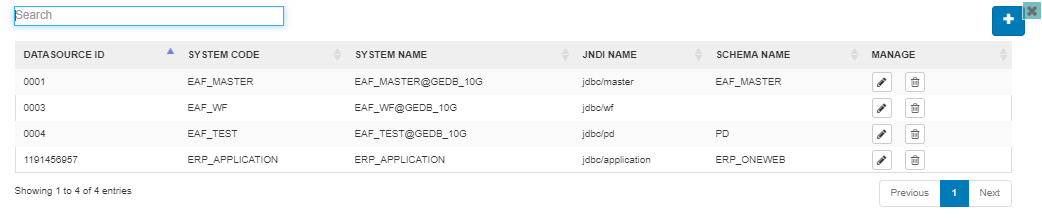
App Designer allows users to configure database connectivity through the **Datasource Configuration** screen.

In this screen, users can:

* Define the database connection
* Select the target schema
* Manage connection properties centrally

Once configured, the data source becomes available for entity configuration.

<figure><img src="https://2015371994-files.gitbook.io/~/files/v0/b/gitbook-x-prod.appspot.com/o/spaces%2FMpDjHWFRUtZ5nJcSfVXd%2Fuploads%2FXm4L4ocQxthQu7AAjPJX%2Fimage.png?alt=media&#x26;token=d43090ae-e1ac-4e13-8cb7-4e90f70975f6" alt=""><figcaption></figcaption></figure>

<figure><img src="https://2015371994-files.gitbook.io/~/files/v0/b/gitbook-x-prod.appspot.com/o/spaces%2FMpDjHWFRUtZ5nJcSfVXd%2Fuploads%2FSFTsXYBbV3HikqHm9GcH%2Fimage.png?alt=media&#x26;token=965e5136-f337-4ff6-a837-792f9e8d4ab1" alt=""><figcaption></figcaption></figure>

***

#### Step 2: Associate Data Source with Entity

After defining the data source, users can assign it at the **Entity Configuration** level.

This step links the entity—and all its Smart Forms—to the selected database schema.

<figure><img src="https://2015371994-files.gitbook.io/~/files/v0/b/gitbook-x-prod.appspot.com/o/spaces%2FMpDjHWFRUtZ5nJcSfVXd%2Fuploads%2FN92tjrYVBMmk7gWjGztL%2Fimage.png?alt=media&#x26;token=cf8d9da3-d72e-4cc3-82c1-ea842f6b0411" alt=""><figcaption></figcaption></figure>

<figure><img src="https://2015371994-files.gitbook.io/~/files/v0/b/gitbook-x-prod.appspot.com/o/spaces%2FMpDjHWFRUtZ5nJcSfVXd%2Fuploads%2FEuGxcqBqFD6CwgQ9yiPd%2Fimage.png?alt=media&#x26;token=4953090b-acb3-4fd5-9a44-60c44bdd6032" alt=""><figcaption></figcaption></figure>

***

### Map Modules and Fields

Once the entity is linked to a data source, users can map UI structures to database structures.

***

#### Step 3: Map Module to Database Table

Each module within an entity represents a logical data group.

To map a module to a table:

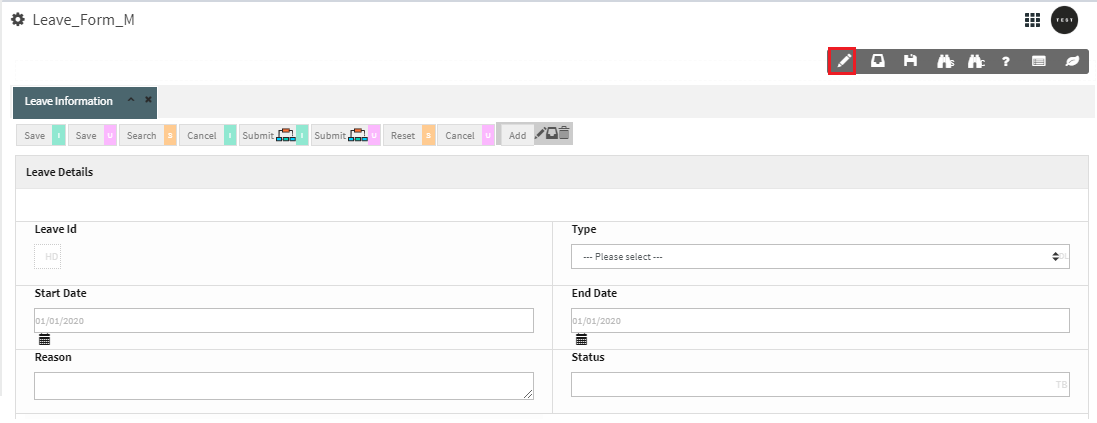
1. Click the **Edit** icon to open **Module Configuration**
2. Select the database table to associate with the module

<figure><img src="https://2015371994-files.gitbook.io/~/files/v0/b/gitbook-x-prod.appspot.com/o/spaces%2FMpDjHWFRUtZ5nJcSfVXd%2Fuploads%2FolYCeyDzzUHrAAG8Hcnb%2Fimage.png?alt=media&#x26;token=1aa72f8c-ee04-4e97-b5b1-9596d6e0a568" alt=""><figcaption></figcaption></figure>

<figure><img src="https://2015371994-files.gitbook.io/~/files/v0/b/gitbook-x-prod.appspot.com/o/spaces%2FMpDjHWFRUtZ5nJcSfVXd%2Fuploads%2FuqijrjlP88s3BJL0dZFp%2Fimage.png?alt=media&#x26;token=89e0d78d-9051-47af-b25b-937490573302" alt=""><figcaption></figcaption></figure>

***

#### Step 4: Map Fields to Table Columns

Each Smart Form field must be mapped to a database column to enable data persistence and retrieval.

To map a field:

1. Click the **Edit** icon on the field to open **Field Configuration**
2. Select the associated database column

<figure><img src="https://2015371994-files.gitbook.io/~/files/v0/b/gitbook-x-prod.appspot.com/o/spaces%2FMpDjHWFRUtZ5nJcSfVXd%2Fuploads%2F803xG1xJZF9XcrzUm3ga%2Fimage.png?alt=media&#x26;token=46467cb7-58d3-4c05-9ef3-1632276e1d60" alt=""><figcaption></figcaption></figure>

<figure><img src="https://2015371994-files.gitbook.io/~/files/v0/b/gitbook-x-prod.appspot.com/o/spaces%2FMpDjHWFRUtZ5nJcSfVXd%2Fuploads%2Fo8T6OYizK6Af5Aqwecez%2Fimage.png?alt=media&#x26;token=088c77ea-036a-4491-b9aa-eadfb8c0776c" alt=""><figcaption></figcaption></figure>

***

### Enable Search Capabilities

To allow Smart Forms to search database records:

* Enable **SearchCriteria** for fields used as filters
* Enable **ShowSearch** for fields shown in search results

<figure><img src="https://2015371994-files.gitbook.io/~/files/v0/b/gitbook-x-prod.appspot.com/o/spaces%2FMpDjHWFRUtZ5nJcSfVXd%2Fuploads%2FTQnLDzguOJsm56apdGA1%2Fimage.png?alt=media&#x26;token=18300f08-ad76-45c3-8109-e32f75d95a28" alt=""><figcaption></figcaption></figure>

***

#### Trigger Search Action

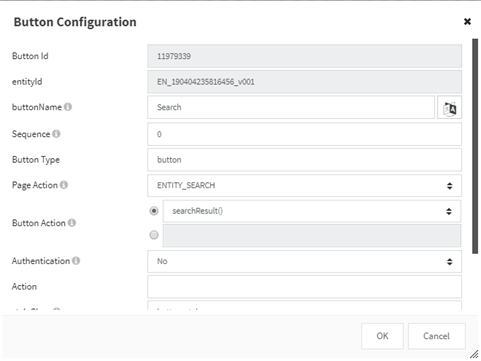
Add an **Entity Button** with:

* Page Action: `ENTITY_SEARCH`
* Button Action: `searchResult()`

<figure><img src="https://2015371994-files.gitbook.io/~/files/v0/b/gitbook-x-prod.appspot.com/o/spaces%2FMpDjHWFRUtZ5nJcSfVXd%2Fuploads%2FcKZMlrJFVB3C9G6TWC1p%2Fimage.png?alt=media&#x26;token=3f759d10-8a4a-4bba-85be-25215efe30d6" alt=""><figcaption></figcaption></figure>

<figure><img src="https://2015371994-files.gitbook.io/~/files/v0/b/gitbook-x-prod.appspot.com/o/spaces%2FMpDjHWFRUtZ5nJcSfVXd%2Fuploads%2FrOaDv6EQKRxMFX6FCxma%2Fimage.png?alt=media&#x26;token=56d8a339-d182-4b4a-a057-1c7fe1af874e" alt=""><figcaption></figcaption></figure>

***

### Enable Data Insert and Update

To persist data changes:

* Add **Entity Buttons** with `saveEntity()`
* Available save options:
  * `saveEntity()` – save and navigate
  * `saveDraftEntity()` – save and stay on page
  * `saveEntityCommit()` – save with explicit commit

#### Insert Mode

Use Page Action: `ENTITY_INSERT`

<figure><img src="https://2015371994-files.gitbook.io/~/files/v0/b/gitbook-x-prod.appspot.com/o/spaces%2FMpDjHWFRUtZ5nJcSfVXd%2Fuploads%2FUUKaij4JIuAwuRF8wTIv%2Fimage.png?alt=media&#x26;token=fd95a9b3-d3b4-445d-abfa-403173dee8e8" alt=""><figcaption></figcaption></figure>

<figure><img src="https://2015371994-files.gitbook.io/~/files/v0/b/gitbook-x-prod.appspot.com/o/spaces%2FMpDjHWFRUtZ5nJcSfVXd%2Fuploads%2F8xFMHkiPXj2tLIyV32WH%2Fimage.png?alt=media&#x26;token=0dcd320e-b754-4552-a5e7-3982b48ff246" alt=""><figcaption></figcaption></figure>

#### Update Mode

Use Page Action: `ENTITY_UPDATE`

<figure><img src="https://2015371994-files.gitbook.io/~/files/v0/b/gitbook-x-prod.appspot.com/o/spaces%2FMpDjHWFRUtZ5nJcSfVXd%2Fuploads%2FdqQ5XlhYYu8hQJgTMICi%2Fimage.png?alt=media&#x26;token=300e8f83-e309-4407-9568-d615e5403050" alt=""><figcaption></figcaption></figure>

<figure><img src="https://2015371994-files.gitbook.io/~/files/v0/b/gitbook-x-prod.appspot.com/o/spaces%2FMpDjHWFRUtZ5nJcSfVXd%2Fuploads%2F3JsNcejPd2iqzeYWQydu%2Fimage.png?alt=media&#x26;token=af42c309-72ca-47bf-a0ba-9af2d977764f" alt=""><figcaption></figcaption></figure>

***

### Summary

**Smart Forms provide a structured and governed way to access databases through the UX/UI layer**.

With App Designer, developers can:

* Configure data sources and schemas visually
* Map entities, modules, and fields to database structures
* Enable searching, insertion, and updating of data
* Rely on ONEWEB to manage all CRUD operations securely

This model ensures that **database access remains controlled, maintainable, and aligned with Data & Content Management best practices**.


---

# Agent Instructions: Querying This Documentation

If you need additional information that is not directly available in this page, you can query the documentation dynamically by asking a question.

Perform an HTTP GET request on the current page URL with the `ask` query parameter:

```
GET https://docs.onewebstack.com/building-apps/data-and-content-management/database-access-management/data-access-from-ux-ui/access-database-from-smart-forms.md?ask=<question>
```

The question should be specific, self-contained, and written in natural language.
The response will contain a direct answer to the question and relevant excerpts and sources from the documentation.

Use this mechanism when the answer is not explicitly present in the current page, you need clarification or additional context, or you want to retrieve related documentation sections.